自然な言葉がビジネスを変える。

WalkMe AIChoose your starting point
AIインサイト簡略化されたマーケティング用ワイヤーフレーム
WalkMe All systems
AI Insights

What would you like to explore today?

All systems Send
How many systems does my account have?What are the most active systems?
Show me Copilot usage across the organization
Analyzing
Thought process
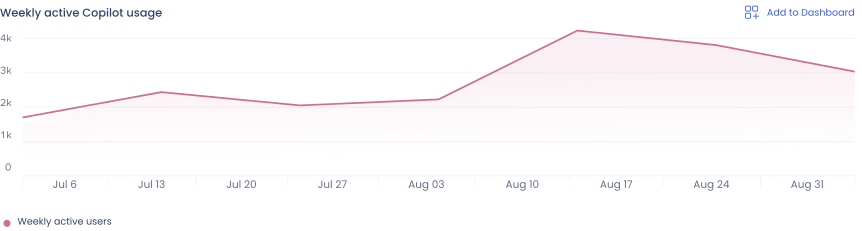
Weekly Copilot usage chart

Weekly active users is up modestly over the past 2 months, but activation is only 38% of licensed seats, flat for the same time period.
| Copilot Production Last 2 months (Jul 6-Aug 31)
Break license utilization down by department
Analyzing
Thought process
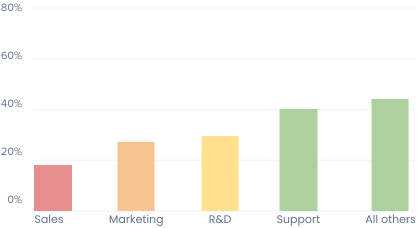
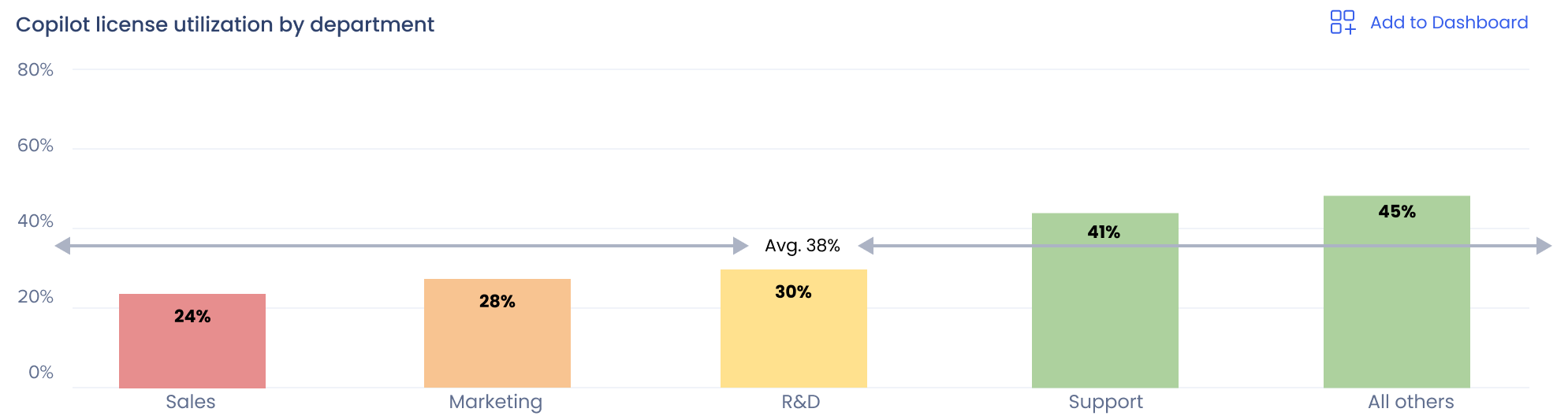
Copilot license utilization by department: Sales 24%, Marketing 28%, R&D 30%, Support 41%, All others 45%, average 38%

Sales has the lowest activation rate (24%) despite being the most heavily licensed department.

Ask a follow-up questionAll systemsSend

Copilot dashboard

Weekly active usersExisting insight
3,064
Count by action typeExisting insight
Copilot license utilization by department
Copilot license utilization by department chart
Pinned to Insights dashboard
スクロール形式のマーケティングストーリー向けに、プロダクトの構造を簡略化しています。各状態に明確なアクションを1つ
01 / 04

質問から始めましょう。

利用状況について、分かりやすい言葉で何でも質問して回答を得られます。ライセンスの利用状況、ユーザーの行動、アプリ内ガイダンスの効果についての質問など、何でも対応します。

02 / 04

座って回答を待ちましょう。

WalkMeはグラフや表とともに回答を返します。データの可視化は回答内容に応じて最適化されます。ダッシュボードを絞り込んで探す必要はありません。

03 / 04

数値をさらに深く掘り下げる。

フォローアップの質問をして分析を深めましょう。すべての回答には根拠情報が付いているため、どこから来たデータか、どのように計算されたかが正確に分かります。

04 / 04

保存していつでも見返せます。

任意の表やグラフをカスタムダッシュボードに保存すれば、以前のチャットを再作成せずに後から見返せます。セッション履歴で以前の会話を続けることもできます。

Build
Copilot  |  Production
AI Authoring
What could I build to get Sales actually using Copilot?
A ShoutOut nudging reps toward “Draft with Copilot” when composing follow-up emails, or a Launcher pinning Copilot shortcuts inside Salesforce.
Let’s start with a ShoutOut in Outlook.
Got it. Should the ShoutOut fire on every compose window, or only for longer emails where drafting help matters most?
Only when composing an email or reply longer than a few lines. Let’s start.
Creating a ShoutOut
Sounds good. I’ve designed the ShoutOut based on your instructions. I’ve generated a placeholder image and copy for you to review.
Building your ShoutOut
PlanReady to build

Copilot Activation ShoutOut

Looks like you’re drafting an email…

Copilot can help with that. Try it out!

  • Frequency: Appears when a user composes an email longer than a few lines.
The image looks fine. Change the background to yellow, delete “Try it out!”, and instead add that as a white CTA button that opens Copilot.
No problem. I’ve updated the ShoutOut based on your instructions. Anything else?
Building your ShoutOut
PlanReady to build

Copilot Activation ShoutOut

Looks like you’re drafting an email…

Copilot can help with that.

  • Frequency: Appears when a user composes an email longer than a few lines.
  • CTA: https://outlook.office.com/mail/copilot

Yes actually. Can we limit frequency to once, and only show to my Sales segment?
You got it. The display logic has been updated. Are we ready to build?
Building your ShoutOut
PlanReady to build

Copilot Activation ShoutOut

Looks like you’re drafting an email…

Copilot can help with that.

  • Frequency: Appears once when a user composes an email longer than a few lines.
  • Segment: Sales
  • CTA: https://outlook.office.com/mail/copilot

What would you like to build today?

Ask before acting
What could I build to get Sales actually using Copilot?
WalkMeA ShoutOut nudging reps toward “Draft with Copilot” when composing follow-up emails, or a Launcher pinning Copilot shortcuts inside Salesforce.
Let’s start with a ShoutOut in Outlook.
WalkMeGot it. Should the ShoutOut fire on every compose window, or only for longer emails where drafting help matters most?
Only when composing an email or reply longer than a few lines. Let’s start
Creating a ShoutOut...
The image looks fine. Change the background to yellow, delete “Try it out!”, and instead add that as a white CTA button that opens Copilot.
Only when composing an email or reply longer than a few lines. Let’s start
Sounds good. I’ve designed the ShoutOut based on your instructions. I’ve generated a placeholder image and copy for you to review.
The image looks fine. Change the background to yellow, delete “Try it out!”, and instead add that as a white CTA button that opens Copilot.
PlanReady to build

Copilot Activation ShoutOut

Looks like you’re drafting an email…

Copilot can help with that. Try it out!

  • Frequency: Appears when a user composes an email longer than a few lines.
The image looks fine. Change the background to yellow, delete “Try it out!”, and instead add that as a white CTA button that opens Copilot
WalkMeNo problem. I’ve updated the ShoutOut based on your instructions. Anything else?
Yes actually. Can we limit frequency to once, and only show to my Sales segment?
PlanReady to build

Copilot Activation ShoutOut

Looks like you’re drafting an email…

Copilot can help with that.

  • Frequency: Appears when a user composes an email longer than a few lines.
  • CTA: https://outlook.office.com/mail/copilot
Yes actually. Can we limit frequency to once, and only show to my Sales segment?
WalkMeYou got it. The display logic has been updated. Are we ready to build?
Yes actually. Can we limit frequency to once, and only show to my Sales segment?
PlanReady to build

Copilot Activation ShoutOut

Looks like you’re drafting an email…

Copilot can help with that.

  • Frequency: Appears once when a user composes an email longer than a few lines.
  • Segment: Sales
  • CTA: https://outlook.office.com/mail/copilot
01 / 05

ビジネス上の課題を
説明する。

自分の言葉で始めましょう。会話を始めるために、構築したいビジネス課題やデジタル導入ソリューションを説明します。

02 / 05

最適なアプローチを話し合う。

状況や想定しているソリューションについてWalkMeに相談しましょう。検討中の内容を説明し、選択肢を話し合います。WalkMeがライブプレビューを生成する前に、パラメータを揃えます。

03 / 05

構築前にプランを編集する。

WalkMeが会話をライブプレビューとして形にする様子を確認し、内容を調整できます。画像やCTAを追加したり、コピーやデザインを微調整したり、考えを変えて別のガイダンス種類に切り替えることもできます。

04 / 05

ルールとセグメンテーションを追加する。

プロセスのどの段階でも、セグメントを定義し、表示条件を作成できます。アプリ内ガイダンスを表示したいシナリオを説明するだけで、WalkMeがロジックを組み立てます。

05 / 05

承認すれば完了です。

プランに納得したら、承認するだけです。WalkMeがプランを完成したビルドに変換し、エディターで管理できるようにします。あとは、次に何を作るかだけです。