Qu’est-ce que la migration d’applications ?
La migration d’applications désigne le processus de déplacement d’une application ou d’un système logiciel d’un environnement à un autre. Cela pourrait impliquer son transfert des serveurs sur site vers le cloud, d’un fournisseur de services cloud à un autre, ou même d’un système d’exploitation à un autre.

Les raisons de la migration d’applications peuvent varier. Elles peuvent inclure :
Réduction des coûts : Passage à une solution d’hébergement plus économique, comme la transition des serveurs sur site vers des services cloud tels qu’AWS, Azure ou Google Cloud Platform.
Évolutivité : Les plateformes cloud offrent des avantages en termes d’évolutivité, permettant aux applications de gérer facilement les fluctuations de la demande sans investir dans du matériel supplémentaire.
Amélioration des performances : La migration peut améliorer les performances en exploitant une infrastructure plus avancée ou en optimisant l’architecture de l’application.
Améliorations de la sécurité : Les fournisseurs de cloud disposent souvent de mesures de sécurité robustes, ce qui peut améliorer la posture globale de sécurité d’une application.
Mises à jour technologiques : La migration d’une application peut impliquer la mise à jour des technologies sous-jacentes, comme le passage des systèmes hérités aux nouvelles plateformes ou frameworks.
Expansion géographique : Rapprocher les applications des utilisateurs dans différentes régions géographiques peut réduire la latence et améliorer l’expérience utilisateur.
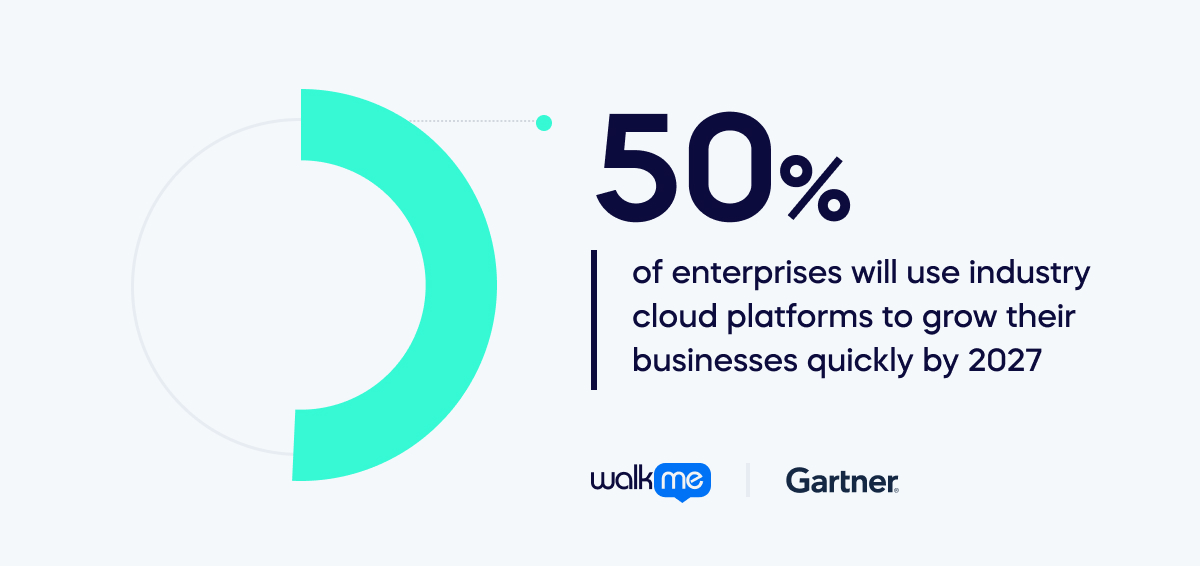
Exigences de conformité : La migration peut être nécessaire pour assurer la conformité aux normes réglementaires, en particulier lors du traitement de données sensibles. Le processus de migration vers le cloud, en particulier, est en plein essor. Gartner prédit que plus de 50 % des entreprises utiliseront des plateformes cloud sectorielles pour développer rapidement leurs activités d’ici 2027. Ce chiffre a considérablement augmenté, alors que moins de 15 % le faisaient en 2023.
Comment les PAD facilitent les transitions en douceur lors de la migration d’applications
Les plateformes d’adoption numérique (PAD) jouent un rôle crucial en facilitant des transitions plus fluides lors de la migration d’applications en fournissant un support complet aux utilisateurs tout au long du processus. Voici comment elles le font :
Assistance à l’intégration
Les PAD offrent des processus d’intégration guidés qui aident les utilisateurs à comprendre rapidement et à s’adapter à la nouvelle application. WalkMe peut créer des Smart Walk-Thrus, des guides interactifs étape par étape qui accompagnent les utilisateurs dans la nouvelle application. Les utilisateurs peuvent accéder à ces guides à tout moment depuis le menu WalkMe ou en cliquant sur les éléments pertinents à l’écran. Les Smart Walk-Thrus peuvent également être déclenchés automatiquement en fonction du comportement ou du contexte de l’utilisateur, par exemple lorsqu’un utilisateur se connecte pour la première fois, visite une nouvelle page ou effectue une certaine action. Grâce à des tutoriels interactifs, des visites guidées et des conseils contextuels, les utilisateurs peuvent se familiariser avec la nouvelle interface et les nouvelles fonctionnalités, réduisant ainsi la courbe d’apprentissage associée à la migration.
Formation personnalisée
Les PAD exploitent les données et l’analyse des utilisateurs pour offrir des expériences de formation personnalisées. Ils identifient les rôles, les préférences et les niveaux de compétence des utilisateurs pour adapter en conséquence les parcours d’apprentissage et les ressources. WalkMe peut utiliser la segmentation des utilisateurs pour offrir des expériences de formation personnalisées. La segmentation des utilisateurs permet à WalkMe de regrouper les utilisateurs selon divers critères, tels que le rôle, l’emplacement, le département, la langue ou le niveau de compétence. Sur la base de ces segments, WalkMe peut personnaliser le contenu, la conception et le timing des Smart Walk-Thrus et d’autres éléments de guidage pour répondre aux besoins et préférences spécifiques de chaque groupe d’utilisateurs. Par exemple, WalkMe peut montrer différents Smart Walk-Thrus aux directeurs commerciaux, aux commerciaux, aux débutants et aux utilisateurs experts. Cette approche personnalisée garantit que les utilisateurs reçoivent les conseils et le support les plus pertinents en fonction de leurs besoins spécifiques, maximisant ainsi l’efficacité et l’efficience.
Support continu
Les DAP offrent un support continu au-delà de la phase de migration initiale.
WalkMe peut fournir un support à la demande aux utilisateurs grâce à diverses fonctionnalités, telles que SmartTips, ShoutOuts, ActionBot et les Ressources.
- Les SmartTips sont des infobulles qui fournissent des informations supplémentaires ou des conseils sur des éléments spécifiques à l’écran.
- Les ShoutOuts sont des messages pop-up annonçant de nouvelles fonctionnalités, des mises à jour ou des promotions.
- ActionBot est un chatbot qui peut répondre aux questions des utilisateurs, effectuer des tâches ou diriger les utilisateurs vers les bonnes ressources.
- Resources est une base de connaissances consultable qui contient des articles, des vidéos, des FAQ et d’autres documents utiles.
Les utilisateurs peuvent accéder à ces fonctionnalités à tout moment depuis le menu WalkMe ou en cliquant sur les icônes pertinentes à l’écran. Ces fonctionnalités peuvent aider les utilisateurs à obtenir des réponses et des solutions instantanées à leurs questions et défis sans quitter l’application ni contacter le support. Cela garantit que les utilisateurs se sentent soutenus tout au long de leur parcours avec la nouvelle application, favorisant la confiance et la productivité.
Suivi des performances
Les PAD permettent aux organisations de surveiller l’engagement des utilisateurs et les métriques de performance en temps réel. WalkMe peut activer l’analyse pour surveiller l’engagement des utilisateurs et les métriques de performance en temps réel. La PAD peut suivre divers points de données, tels que les interactions des utilisateurs, les modèles d’utilisation, les taux de réussite, les erreurs, les retours, etc. Elle peut également utiliser l’analyse prédictive par IA pour identifier les tendances de comportement des utilisateurs, les risques d’abandon et les lacunes d’adoption. Ces données peuvent être affichées dans des tableaux de bord de gestion, fournissant des aperçus visuels et exploitables du comportement et des résultats des utilisateurs. Les organisations peuvent utiliser ces données pour mesurer l’impact et le ROI de leurs efforts de migration, identifier les domaines d’amélioration et optimiser leurs stratégies de migration en conséquence.
Mécanismes de rétroaction
Les DAP intègrent des mécanismes de retour d’information qui permettent aux utilisateurs de fournir des commentaires et des suggestions directement au sein de l’application.
Les fonctionnalités suivantes sont disponibles avec WalkMe :
- Les mécanismes de retour d’information permettent aux utilisateurs de fournir des commentaires et des suggestions directement dans l’application.
- Des enquêtes pour recueillir les retours des utilisateurs, tels que la satisfaction, le NPS ou les évaluations.
- Des widgets de retour d’information permettent aux utilisateurs de signaler des problèmes, de demander des fonctionnalités ou de partager des idées.
- Des enregistrements d’utilisateurs pour capturer les sessions des utilisateurs et observer comment ils interagissent avec l’application.
Cette boucle de rétroaction permet aux organisations de recueillir des informations précieuses sur les expériences des utilisateurs, les points de friction et les domaines d’amélioration. Les organisations peuvent améliorer de manière itérative le processus de migration et résoudre les problèmes ou préoccupations en sollicitant activement et en répondant aux retours des utilisateurs.
Cas d’utilisation de la migration d’applications
Migration d’applications en entreprise
La migration d’applications trouve des applications pratiques dans divers contextes et industries, motivée par le besoin de modernisation, d’optimisation, d’évolutivité et d’efficacité des coûts. Voici quelques scénarios où la migration d’applications est activement utilisée, ainsi que des exemples de son application à travers différentes fonctionnalités :
Migration vers le cloud
Les organisations migrent souvent leurs applications des serveurs sur site vers l’infrastructure cloud pour tirer parti de l’évolutivité, de la flexibilité et de la réduction des coûts opérationnels. Pendant la migration vers le cloud, les applications sont réarchitecturées et optimisées pour les environnements natifs du cloud. Cela implique de refactoriser les applications monolithiques en microservices, d’implémenter des capacités d’auto-scaling et d’intégrer des services natifs du cloud comme AWS Lambda, Azure Functions ou Google Cloud Pub/Sub.
Modernisation des systèmes hérités
Les systèmes hérités, construits sur des technologies obsolètes, deviennent difficiles et coûteux à maintenir au fil du temps. La migration vers des plateformes modernes aide les organisations à améliorer les performances, renforcer la sécurité et débloquer de nouvelles capacités. Pendant la modernisation, les applications héritées peuvent être migrées vers des plateformes plus récentes telles que des environnements conteneurisés (par exemple, Docker, Kubernetes), des architectures serverless, ou des langages de programmation modernes (par exemple, migration de COBOL vers Java). De plus, les interfaces utilisateur peuvent être redessinées pour offrir une expérience plus intuitive et conviviale.
Consolidation des centres de données
Les organisations disposant de plusieurs centres de données peuvent consolider leur infrastructure pour rationaliser les opérations, réduire les coûts et améliorer l’utilisation des ressources. Lors de la consolidation des centres de données, les applications sont migrées de plusieurs emplacements physiques vers un centre de données centralisé ou un environnement cloud. Cela implique d’évaluer les dépendances, d’optimiser l’allocation des ressources et d’assurer l’intégrité et la sécurité des données tout au long de la migration.
Compatibilité multiplateforme
Les applications développées pour des plateformes spécifiques (par exemple, Windows, iOS, Android) peuvent nécessiter une migration pour prendre en charge plusieurs plateformes afin d’atteindre un public plus large et d’améliorer l’accessibilité des utilisateurs. La migration multiplateforme implique d’adapter les applications pour qu’elles fonctionnent de manière transparente sur différents systèmes d’exploitation et appareils. Cela peut inclure l’utilisation de frameworks de développement multiplateformes comme React Native ou Xamarin, l’implémentation de principes de conception responsive et la garantie de la compatibilité avec différentes tailles d’écran et méthodes de saisie.
Rationalisation du portefeuille d’applications
Les organisations disposant de grands portefeuilles d’applications entreprennent souvent des efforts de rationalisation pour identifier les applications redondantes ou sous-performantes et les consolider ou les retirer pour rationaliser les opérations et réduire les coûts de maintenance. Pendant la rationalisation du portefeuille, les applications sont évaluées en fonction de leur utilisation, de leur valeur commerciale, des frais de maintenance et de l’alignement stratégique. Les applications jugées appropriées pour la migration subissent un processus adapté à leurs besoins spécifiques, qui peut impliquer leur réhébergement, leur refactorisation ou leur remplacement par des alternatives plus modernes.
Migration d’applications vs migration vers le cloud
La migration d’applications et la stratégie de migration vers le cloud sont des concepts liés, mais ils ont des objectifs distincts dans le contexte plus large de la transformation informatique. Comparons les deux :
| Migration d’applications | Stratégie de migration vers le cloud | |
|---|---|---|
| Définition | Déplacement des applications logicielles d’un environnement à un autre. Cela inclut la migration des serveurs sur site vers le cloud, entre fournisseurs de cloud, ou entre centres de données. | Elle englobe la migration de l’infrastructure informatique, des applications et des données d’une organisation vers le cloud. Cela implique de planifier l’approche de migration, les objectifs, le calendrier et de prendre en compte divers composants. |
| Objectifs | Assure que les applications fonctionnent correctement dans le nouvel environnement tout en tirant potentiellement parti d’avantages tels que l’évolutivité, la fiabilité et la rentabilité. | Définit l’approche globale, les objectifs et les délais pour la migration de divers composants informatiques vers le cloud. |
| Tâches impliquées | Réhébergement (lift and shift), refactorisation, réarchitecture ou reconstruction des applications pour s’adapter à l’environnement cible. Focus sur les applications, les dépendances, les configurations et les données. | Évaluation des charges de travail actuelles, identification des applications et services appropriés, sélection d’un modèle de service cloud, choix d’un fournisseur cloud, traitement de la sécurité et de la conformité, estimation des coûts, gouvernance et gestion. |
| Portée | Se concentre principalement sur la migration des applications elles-mêmes. | S’étend au-delà de la migration d’applications pour inclure la migration d’infrastructure, la migration de données, la gestion du changement organisationnel et les efforts d’optimisation continus. |
| Relation avec la stratégie cloud | Sous-ensemble d’une stratégie plus large de migration vers le cloud. | Partie essentielle de la stratégie de migration vers le cloud mais pas le seul objectif. |
| Focus | Applications, leurs dépendances, configurations et données. | Planification et exécution complètes de la migration des composants informatiques, en tenant compte de l’infrastructure, des applications, des données, des facteurs organisationnels et des aspects opérationnels. |
Avantages de la migration d’applications
La migration d’applications offre plusieurs avantages distincts aux organisations :
Évolutivité
Les plateformes cloud offrent généralement une évolutivité dynamique, permettant aux applications de s’adapter facilement aux fluctuations de la demande. En migrant vers le cloud, les organisations peuvent augmenter ou diminuer leurs applications selon les besoins sans la contrainte de gérer l’infrastructure physique.
Réduction des coûts
Les services cloud fonctionnent souvent sur un modèle de paiement à l’utilisation, où les organisations ne paient que pour les ressources qu’elles utilisent. Cela peut entraîner des économies par rapport à la maintenance et à la gestion d’une infrastructure sur site, où les investissements initiaux en matériel et les coûts de maintenance continus sont nécessaires. En effet, les organisations utilisent cet avantage pour éliminer le gaspillage – les chiffres montrent que plus de 40 % des professionnels techniques et commerciaux utilisent des politiques automatisées pour arrêter les charges de travail en dehors des heures opérationnelles afin de réduire les instances sous-utilisées.
Flexibilité et agilité accrues
Les environnements cloud offrent une plus grande flexibilité et agilité par rapport à l’infrastructure traditionnelle sur site. Les développeurs peuvent rapidement provisionner des ressources, expérimenter de nouvelles technologies et déployer des mises à jour plus rapidement, conduisant à une mise sur le marché plus rapide et une plus grande innovation.
Reprise après sinistre et continuité des activités
Les fournisseurs cloud offrent souvent des solutions robustes de reprise après sinistre et de sauvegarde, facilitant la mise en œuvre de stratégies complètes de reprise après sinistre et de continuité des activités. En cas de panne matérielle, de catastrophe naturelle ou d’autre perturbation, les applications peuvent être rapidement restaurées à partir des sauvegardes avec un temps d’arrêt minimal.
Amélioration des performances
Les fournisseurs de cloud offrent généralement une infrastructure robuste et des réseaux mondiaux, ce qui peut conduire à de meilleures performances des applications, une latence réduite et de meilleures expériences utilisateur, en particulier pour les utilisateurs géographiquement dispersés.
Sécurité renforcée
Les fournisseurs de cloud investissent massivement dans des mesures de sécurité pour protéger leur infrastructure et leurs centres de données. Les organisations peuvent utiliser ces fonctionnalités de sécurité en migrant vers un environnement cloud, y compris le chiffrement, la gestion des identités et des accès, la détection des menaces et les certifications de conformité. Les décideurs cloud d’entreprise dans le monde entier considèrent les fonctionnalités de sécurité pour les fournisseurs cloud. 40 % estiment que ‘de solides capacités de protection et de contrôle des données cloud’ est une considération principale. En comparaison, 38 % perçoivent ‘le bon fonctionnement avec les solutions de sécurité existantes’ comme un facteur important.
Portée mondiale
Les fournisseurs cloud disposent de centres de données dans le monde entier, permettant aux organisations de déployer des applications plus près de leurs utilisateurs et de cibler plus efficacement des régions géographiques spécifiques. Cela peut améliorer les performances et réduire la latence pour les utilisateurs accédant à l’application dans le monde entier.
Maintenance et mises à jour plus faciles
Les fournisseurs cloud gèrent une grande partie de la maintenance et des mises à jour de l’infrastructure sous-jacente, y compris les correctifs de sécurité, les mises à niveau matérielles et les mises à jour logicielles. Cela libère le personnel informatique des tâches de maintenance routinières, leur permettant de se concentrer sur des initiatives plus stratégiques.
Défis de la migration d’applications
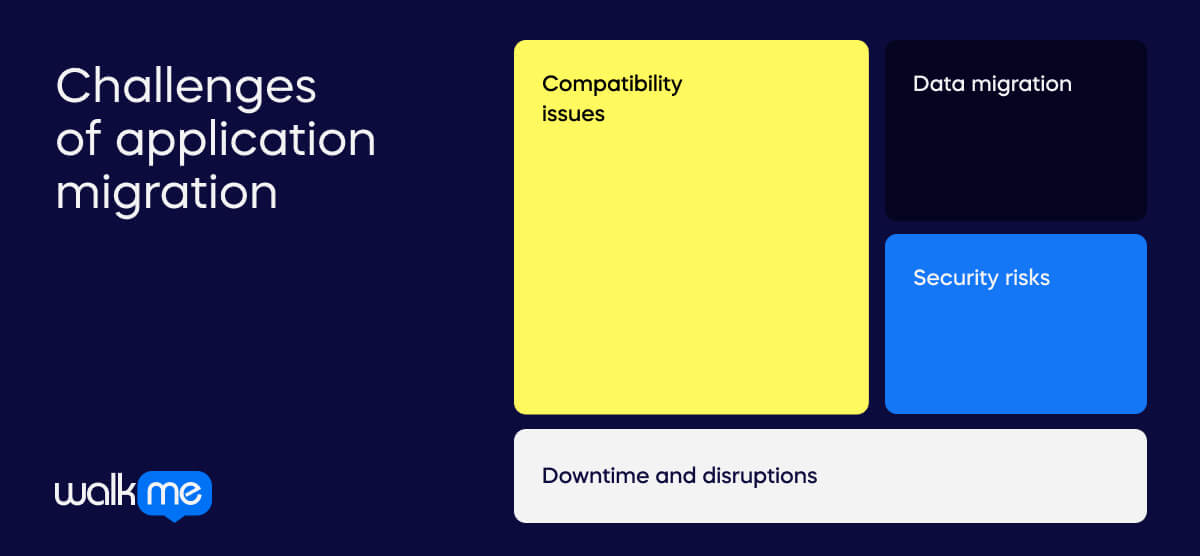
Bien que la migration d’applications offre de nombreux avantages, elle présente également plusieurs défis que les organisations doivent relever :
Problèmes de compatibilité
Les applications peuvent avoir des dépendances ou des intégrations avec du matériel, des logiciels ou des middlewares spécifiques qui ne sont pas facilement compatibles avec l’environnement cible. Assurer la compatibilité et résoudre les problèmes d’interopérabilité peut être complexe et prendre du temps.
Migration des données
Le déplacement de grands volumes de données des systèmes sur site vers le cloud peut être difficile, en particulier si les données sont sensibles ou nécessitent une manipulation minutieuse. Assurer l’intégrité des données, la sécurité et la conformité tout au long du processus de migration est essentiel mais difficile à réaliser.
Temps d’arrêt et perturbations
La migration d’applications nécessite souvent des temps d’arrêt, impactant les opérations commerciales et perturbant l’accès des utilisateurs. Minimiser les temps d’arrêt et assurer une transition en douceur sans affecter les niveaux de service nécessite une planification et une exécution minutieuses.
Risques de sécurité
La migration des applications et des données vers le cloud introduit de nouveaux risques et défis en matière de sécurité, notamment les violations de données, les accès non autorisés et les infractions à la conformité. La protection des informations sensibles, la mise en place de contrôles d’accès appropriés et le maintien de la conformité aux exigences réglementaires sont des considérations essentielles tout au long du processus de migration.
L’avenir de la migration d’applications avec les PAD
L’avenir de l’utilisation des plateformes d’adoption numérique (PAD) pour faciliter les migrations d’applications est très prometteur, avec plusieurs développements potentiels : Les plateformes d’adoption numérique pourraient évoluer pour offrir des flux de travail de migration plus automatisés, exploitant l’intelligence artificielle (IA) et les algorithmes d’apprentissage automatique (ML) pour analyser les applications existantes, identifier les exigences de migration et générer automatiquement des plans de migration.
Le logiciel pourrait s’intégrer plus étroitement avec les outils et services de migration vers le cloud, offrant une connectivité et une interopérabilité transparentes entre les fonctionnalités PAD et les plateformes de migration cloud. À mesure que les pratiques DevOps continuent de gagner du terrain dans le développement et le déploiement d’applications, les PAD pourraient s’intégrer plus étroitement aux chaînes d’outils DevOps pour faciliter l’intégration continue, la livraison et le déploiement des applications migrées (CI/CD).
Avec la diversité croissante des environnements et des plateformes cloud, les futurs PAD pourraient offrir une prise en charge multiplateforme, permettant aux organisations de migrer leurs applications de manière transparente entre différents fournisseurs cloud ou environnements cloud hybrides. Compte tenu de l’importance croissante de la sécurité et de la conformité dans le cloud, les futurs PAD pourraient intégrer des fonctionnalités de sécurité et de conformité améliorées pour aider les organisations à atténuer les risques associés aux migrations d’applications.
L’avenir de l’utilisation des plateformes d’adoption numérique pour faciliter les migrations d’applications sera probablement caractérisé par une automatisation, une intégration et une intelligence accrues, permettant aux organisations de migrer leurs applications vers le cloud de manière plus efficace, sécurisée et réussie.