
Salesforce forecasting (SFDC): How it works and setup steps

Salesforce forecasting, often searched as SFDC forecasting, is the forecasting feature built into Salesforce Sales Cloud. It predicts revenue for a period from the opportunities in your pipeline, with each sales stage mapped to a forecast category such as pipeline, best case, commit, and closed. Sales teams use it to measure progress against quotas and adjust forecasts as deals move through the sales cycle.
Sales forecasts help businesses plan resources by predicting future revenue. Accurate sales forecasting also supports customer centricity and better future operations.
When forecasts go wrong, companies face challenges with pricing, product delivery, and customer satisfaction. But accurate forecasts can help the company make better investments and maintain business resilience.
Using a CRM like Salesforce improves sales forecasting accuracy compared to manual spreadsheets.
What is Salesforce forecasting?
Salesforce forecasting is an in-built tool that helps businesses track sales opportunities and predict revenue. It organizes deals into categories based on their likelihood of closing.
With this feature, organizations also gain a clear picture of potential revenue, helping them plan for growth and manage risks. Each opportunity includes a probability percentage, allowing sales teams to focus on the most promising deals.
The pipeline represents all open opportunities, while forecasts estimate revenue for a specific period, such as a month, quarter, or year. A strong pipeline ensures steady sales, while accurate forecasts support better decision-making.
Sales teams can customize forecasts by sales role, revenue model, industry, or other factors. The platform provides an easy-to-use configuration that helps companies tailor forecasts to their business needs.
How does Salesforce forecasting work?
Knowing how Salesforce forecasting works is vital for businesses. It helps manage sales, set realistic goals, boost employee morale, and plan for growth with accurate sales predictions.
Here are the elements of its inner workings:
Types of sales forecasts in Salesforce

Businesses can choose from various sales forecast types. For instance, companies can use product family forecasts to track revenue and quantity sold for product groups. Sales teams could also benefit from overlay split forecasts, which highlight team members’ contributions to deals without making them the primary salesperson.
In addition, opportunity revenue split forecasts distribute deal credit among team members, with the total adding up to 100%. Then, territory forecasts roll up totals through a territory hierarchy instead of the role hierarchy, tracking sales by region rather than by individual reps.
Forecast category rollups
Salesforce offers single and cumulative forecasts. A single forecast shows the value from one category, while a cumulative forecast combines multiple categories. The Closed category includes only finalized deals. The Commit category adds committed deals to closed ones. The Most Likely category includes closed, committed, and most likely deals.
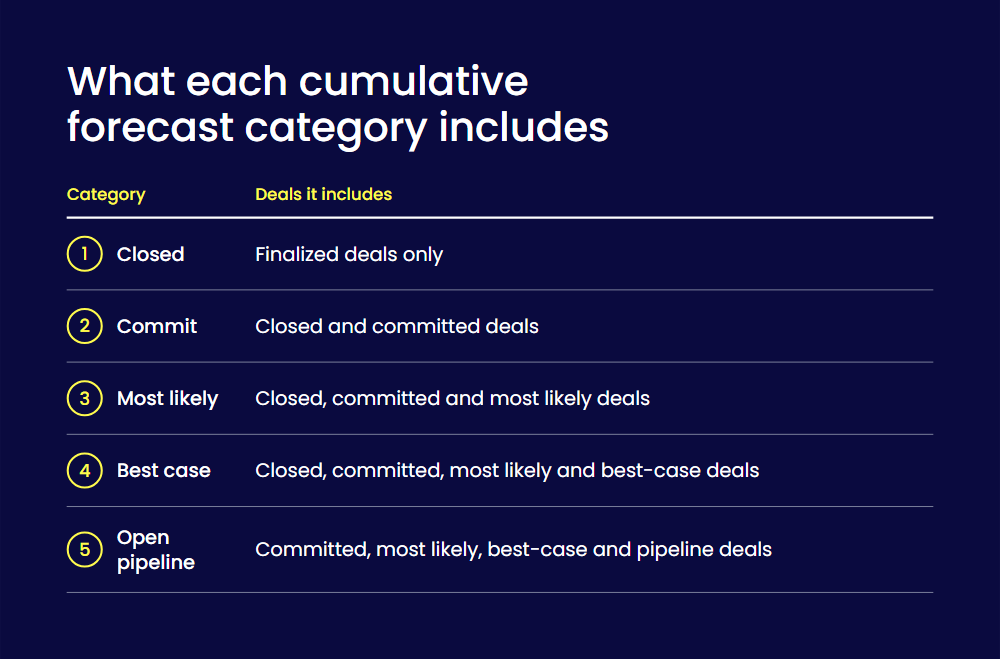
The Best Case category expands further by adding best-case deals. The Open Pipeline category includes committed, most likely, best-case, and pipeline deals. Businesses use cumulative forecasts to track deal progress and estimate revenue more accurately.
Forecast hierarchy and role-based visibility
The forecast hierarchy is a list of forecast users that shows how your company groups forecast totals. It controls data visibility, allowing managers to view their team’s forecasts.
In role-based hierarchies, the system generates levels automatically from the user role hierarchy, and you identify the forecast managers. Forecast managers can view and adjust forecasts for people beneath them in the hierarchy. Each rep and manager can view and adjust their own forecasts.
Non-weighted vs weighted pipeline forecasting
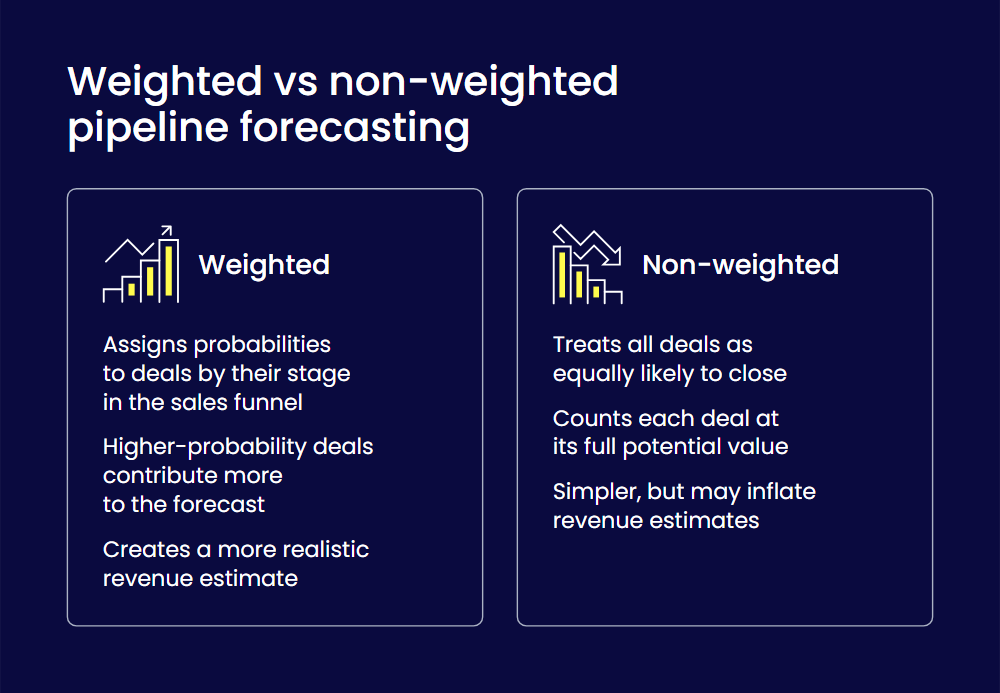
Weighted forecasting assigns probabilities to deals based on their stage in the sales funnel. Higher-probability deals contribute more to the forecast, creating a more realistic revenue estimate.
Non-weighted forecasting treats all deals as equally likely to close, using their full potential value. This method simplifies forecasting but may inflate revenue estimates.
What are the Salesforce forecasting features?
Using Salesforce forecasting tools can make your sales forecasts more accurate and reliable. These tools give a clear view of your sales pipeline and remove guesswork.
Here are the Salesforce forecasting features you should know:
Custom forecast categories and multi-currency support
Custom forecast categories help businesses sort opportunities by closing likelihood, improving sales analysis and team focus. You can rename categories, hide ones that don’t apply, and change the stage-to-category mappings to refine predictions.
Multi-currency support allows global businesses to work in multiple currencies. Each user can set a personal currency, which is the default currency in their quotas, forecasts, opportunities, quotes, and reports, depending on the forecasting version. To enable it, search for Company Information in Setup, click Edit, and check Activate Multiple Currencies.
AI-powered insights with Einstein forecasting
Using AI and machine learning, Einstein Forecasting analyzes past opportunities, related account records, history, and activities, plus each owner’s annual win rates. It builds a predictive model and shows revenue predictions for the current forecast period, each with a confidence range and the top factors behind it.
Users can focus the model on specific opportunity segments, such as client groups or sales regions.
Interactive dashboards and reporting tools
Salesforce forecasting dashboards and reports display sales data, highlight trends, and track performance. Users analyze insights, adjust forecasts, and make informed decisions. Built-in and third-party tools update data in real time, provide customizable charts, and offer detailed views.
How to set up Salesforce forecasting
A structured approach to Salesforce forecasting helps set realistic sales targets, quotas, and commissions. This keeps sales teams motivated and focused on organizational goals.
A step-by-step process also tracks sales performance, spots areas for improvement, and enhances user adoption.
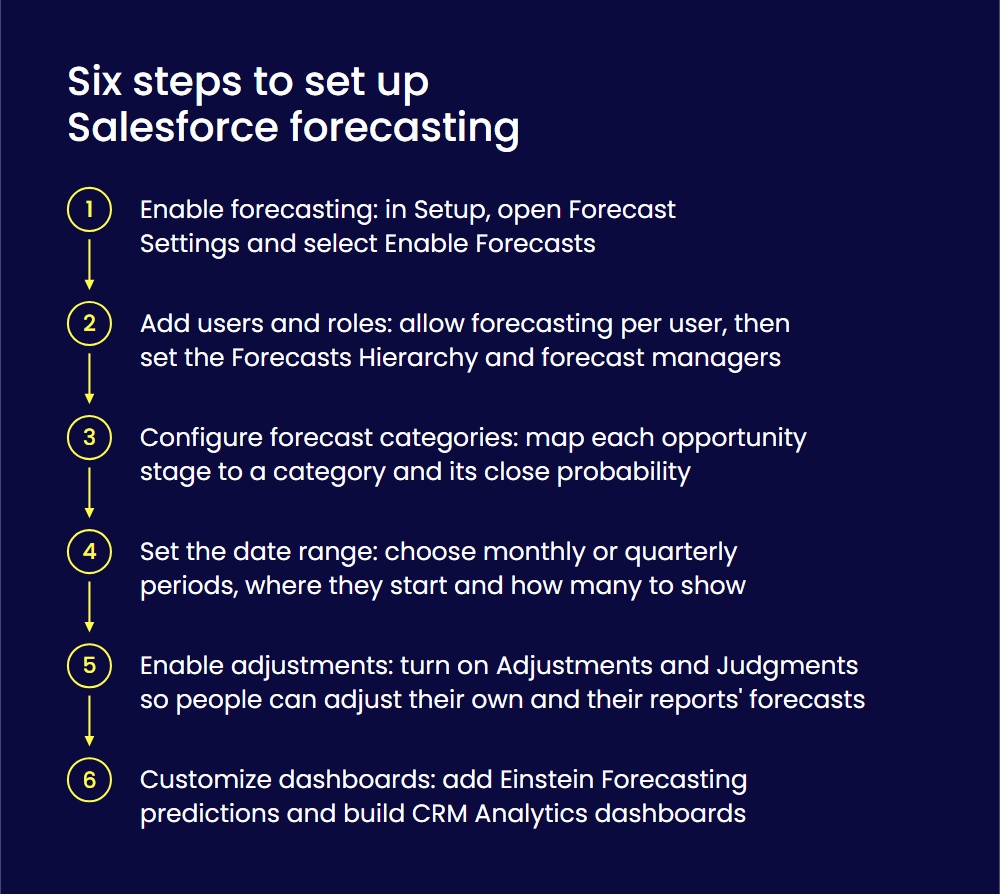
Here are six steps to set up your Salesforce forecasting process:
Step 1: Enable forecasting in Salesforce
To enable forecasting in Salesforce, open Setup. In the Quick Find box, type Forecast Settings and select it.
Next, select Enable Forecasts. This will activate the forecasting feature and allow you to set up sales forecasts.
Step 2: Add users and assign roles
To set up users and assign roles for Salesforce forecasting, first enable the Allow Forecasting permission in each user account. Afterward, go to Forecasts Hierarchy in Setup to enable users at each level and identify forecast managers.
The hierarchy levels come from the user role hierarchy, and only one person at each level can be the forecast manager. Every user involved in forecasting must be in the hierarchy, which dictates who can view or modify forecasts.
Step 3: Configure forecast categories
Each opportunity stage links to a forecast category that shows its likelihood to close. For example, a deal under negotiation has a higher chance of closing and is marked as committed. Early-stage opportunities belong to your open pipeline.
The Opportunity object’s Stage field has a default mapping. But you can adjust it to fit your business and change the close probability for each category.
Step 4: Set the forecast date range
To set the forecast date range in Salesforce, go to Forecast Settings. In Setup, type Forecast Settings in the Quick Find box and select it. Under Choose a default date range, click Edit. Select the forecast period, choose where it starts in Starting On, and choose how many periods to show in Extending For.
You can forecast by month or by quarter. For example, selecting Quarterly, Current quarter, and 4 quarters shows four quarters, starting with the current one. Then, save your changes.
Step 5: Enable forecast adjustments and overrides
Adjusting a forecast updates the expected value to reflect a more accurate estimate, whether higher or lower. These changes affect only forecast amounts, not opportunity data.
To enable forecast adjustments, go to Setup, search for Forecast Settings, and select it. Find Enable Adjustments and Judgments, click Edit, and select the checkboxes that let people adjust their own forecasts and those of their direct reports. Save the changes.
Step 6: Customize dashboards and enable predictive analytics
To add predictive analytics to forecasting, use Einstein Forecasting. It adds an Einstein Prediction column to the Forecasts page, with AI-driven revenue predictions for the current forecast period.
To customize CRM Analytics dashboards, open Analytics Studio from the App Launcher and create or open a dashboard. While editing, add widgets such as charts and number widgets, and select a widget to see its properties. You can also add selectors that filter results and design layouts for different devices, like desktop and mobile.
How to improve Salesforce forecast accuracy
Improving Salesforce forecasting accuracy is essential. It helps businesses manage risks, stay financially stable, and make better decisions. It can also lead to better software implementation in the long term.
Here are the ways you can improve your Salesforce forecasting accuracy:
Automate sales activity tracking
Sales forecasts often become inaccurate because reps don’t fully update opportunities. They forget to log calls, change fields, or update records.
But reps should focus on closing deals, not updating data. Automating this process with a digital tool that syncs emails and notes to Salesforce solves the issue.
Clean CRM data on a regular basis
Clean data improves reports, dashboards, and sales insights. Accurate contact details and customer history enable personalized interactions. It saves time by avoiding bad leads and ensures accurate forecasts.
Clean data also builds trust and reduces costs. Regular audits, validation, duplication management, and Salesforce training can keep data accurate.
Establish a structured review process
Sales forecasting is an ongoing process. Regular, structured reviews help improve accuracy by spotting differences between actual sales and forecasts. They also help identify issues or opportunities early, enabling proactive adjustments.
Combining methods like historical and pipeline forecasting provides a fuller view of trends. You could also focus on specific topics per quarter.
For example, in Q1, you could look at how you can collaborate better with the finance team regarding forecasting. Then, in the next quarter, consider whether you could improve current forecasting training opportunities. Annually, revisit forecasting goals and resource allocation for this area.
Incorporate external market trends
After establishing a review process for forecasting data, consider other external factors that could impact it. Consider how your sales team might perform during economic shifts.
Legal shifts can significantly affect your business, so stay updated on laws that may impact you. Market or industry changes, like more people shopping online or new competitor technology, can also affect your sales.
Optimizing Salesforce forecasting for long-term success
Managing sales forecasting manually takes time and often causes errors. With teams working in different locations, key details can get lost. Salesforce’s forecasting tools help businesses get real-time insights and improve pipeline accuracy.
To keep forecasts reliable, companies should follow best practices like automated data tracking. Businesses must also consider market trends, economic shifts, and competitor actions.
Regular employee training ensures that sales teams use the tool well. It also helps them avoid underestimating or inflating forecasts to meet quotas.
FAQs
Salesforce forecasting helps businesses make wise decisions, use resources wisely, and plan strategies. Overall, accurate sales predictions boost revenue and drive success.
Reports show what is already in your sales data, such as the number of deals closed. Forecasts estimate revenue for a future period from your open opportunities, grouped by forecast category, and managers can adjust them as deals move.
In Salesforce forecasting, the hierarchy controls how forecast totals add up in a company. It also decides who can see and change forecasts based on their role.