
LMS vs. LCMS: What’s the difference?

An LMS (learning management system) delivers, tracks, and manages training for learners and the administrators who run it. An LCMS (learning content management system) is where course designers create, store, and reuse training content. In short, an LMS is for learners, and an LCMS is for course creators.
Many tools and acronyms exist, and no leader can be an expert in all of them. This makes it difficult to determine your company’s needs and choose the right product.
Creating a positive learning culture with the right content is key. This is especially true because Gallup found that when the workplace recognizes learning a new skill, employees are 56% more likely to strongly agree that they are motivated to learn new skills.
A common point of confusion is the difference between an LMS, which helps you organize and track training, and an LCMS, which lets you create and manage the training content itself.
What is a learning management system (LMS)?
A learning management system (LMS) is an online hub for training and education. It acts as a single, organized place where a company can manage all its learning activities from start to finish.
For administrators, it’s a simple way to upload course materials, enroll users, and track everyone’s progress. They can easily see who has completed their training and generate performance reports. This automation saves time, freeing them to focus on creating better content.
For learners, it provides easy access to their courses, assignments, and grades, allowing them to learn at their own pace. They can revisit materials whenever they need a refresher, making it a useful tool for knowledge retention.
The system can deliver a wide range of content, from simple documents and videos to interactive quizzes and tests. It can also include communication tools such as discussion forums and messaging to help everyone stay connected.
What are the features of an LMS?
Before choosing a Learning Management System (LMS), it’s vital to understand what it can do. This will help you choose the right one to meet your company’s goals and ensure your team uses it successfully.
Employee enrollment
The process for enrolling employees in courses is flexible through an LMS. Individuals can sign themselves up, or managers can assign training to individuals and teams. For required courses, the system can also send deadline reminders and manage waitlists.
Individual learning pathways
A clear learning roadmap within an LMS helps guide each employee’s development. Instead of taking random courses, a person follows a structured path designed for their specific role or to build new skills.
Tracking and reporting capabilities
An LMS can provide managers with reports and dashboards showing who has completed training and their quiz scores. These reports are vital for checking on compliance and understanding the effectiveness of the training.
Course management and delivery
When you purchase an LMS, you get a control center for all your training materials. From this single location, you can upload, organize, and update courses. The platform ensures that training is compatible with any device and supports various formats, including videos and quizzes.
What is a learning content management system (LCMS)?
A Learning Content Management System, or LCMS, is a digital tool that helps you create and manage all your training materials in one central place. While an LMS focuses on the student by tracking their progress, an LCMS focuses on the content itself. It focuses on building, organizing, and storing learning materials.
This system acts as a central library for everything, from text and videos to quizzes. It helps teams work together smoothly by tracking all changes and managing the creation process from start to finish.
One of its biggest benefits is reusability. You can create a piece of content, such as a safety video, once and then easily add it to multiple courses. If you ever need to update that video, you only have to change it in the LCMS, and it will automatically update everywhere it’s used. This saves time and ensures all your training is consistent.
What are the features of an LCMS?
Before using an LCMS system, it’s essential to understand its features. This ensures it fits your needs, gives accurate and reliable results, and works well with your current processes. This helps you get the most value from the system.
So, these are the features you should consider before choosing an LCMS:
Content reusability and modular design
Small, reusable blocks of information within the platform allow you to build new courses. Instead of starting from scratch, you can mix and match blocks to create new training. This feature saves time and keeps employee training consistent across all topics.
Centralized content management
All your training materials live in a single, organized library. This central location prevents duplicate files and ensures everyone uses the most up-to-date content. It also makes it simple to find what you need and control who sees it.
Workflow and collaboration management
Better collaboration is possible when your team creates courses together. Tasks, comments, and feedback are all managed in one place. A clear approval process keeps everyone aligned, helping you create training materials faster.
Content creation and authoring tools
Simple authoring tools mean anyone can create engaging courses without being a tech expert. These tools also provide drag-and-drop builders and templates that work on any device. Adding quizzes, videos, and other interactive elements makes the learning experience more fun.
What are the differences between an LMS and an LCMS?
Think of it like this: an LMS is for the student, while an LCMS is for the course creator.
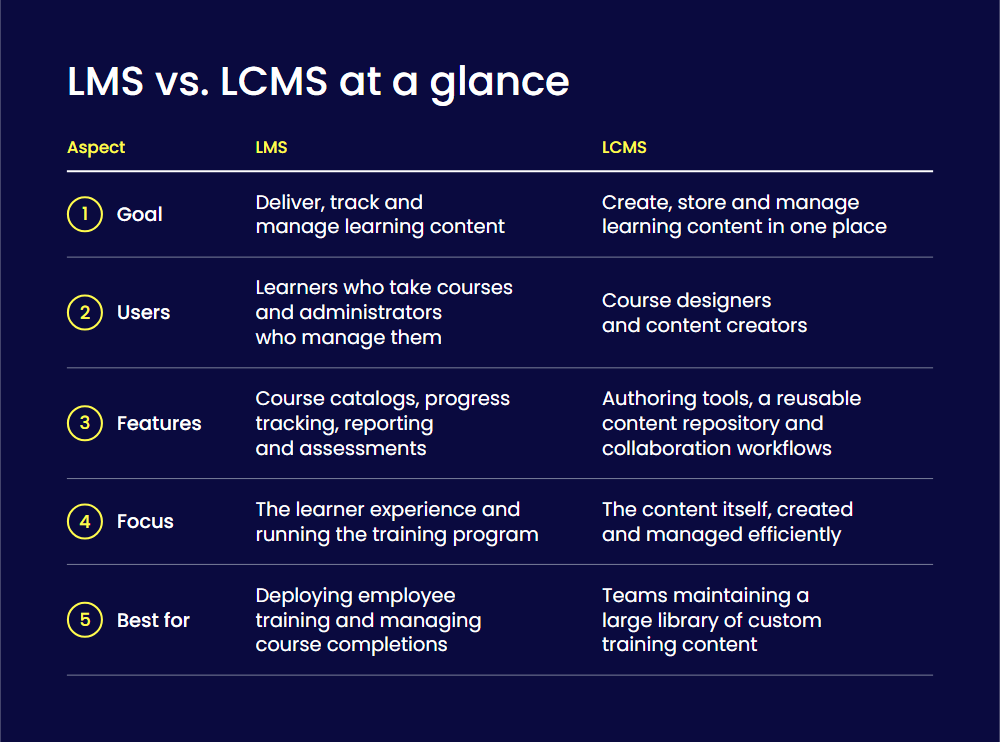
Your choice depends on what you need most. This could be a system to manage your students, or a system to manage your content. Many platforms do both now, but knowing the difference helps you choose the right tool.
Here are the differences between an LMS and an LCMS:
| LMS | LCMS | |
| Goal | Its purpose is to deliver, track, and manage learning content. | Its goal is to create, store, and manage learning content in a central location. |
| User (s) | Users include learners who take courses and administrators who manage them. | The users are course designers and content creators who build the training materials. |
| Features | Features include course catalogs, user progress tracking, reporting, and assessments. | Features include content authoring tools, a repository for reusable content, and collaboration workflows. |
| Focus | The focus is on the learner experience and administering the overall training program. | The focus is on the content itself, enabling efficient creation and management of learning materials. |
| Best for | This system is ideal for deploying employee training and managing course completions. | This platform is excellent for teams that need to develop and maintain a large library of custom training content. |
How can you choose the right one for your business?
Picking the right learning system is a big decision for your company. Your choice affects how well you train your team, how much you spend, and whether you meet your learning goals.
Choosing the wrong system can waste money and make on-the-job training ineffective. Here are some tips on choosing the best one for your organization:
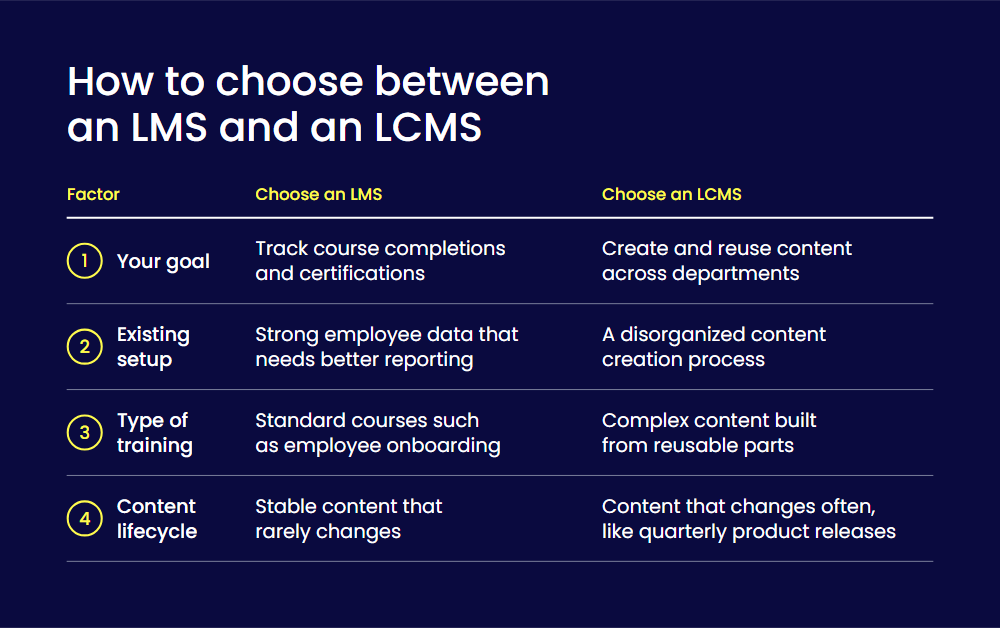
Choose a goal for system adoption
The system you adopt is dependent on your organizational needs. An LMS is best for tracking course completions and certifications. This makes it invaluable for healthcare firms to ensure all staff complete required safety training.
An LCMS is better suited for creating and managing reusable content. This type of system suits a company that updates a safety module and distributes it across multiple departments.
Look at your existing training infrastructure
Your current technology setup is also an essential factor when choosing either an LCMS or an LMS. A company with a robust employee data management system might need an LMS to improve reporting.
But a business with a disorganized content creation process would benefit from an LCMS. This tool could help it centralize its efforts before publishing courses to its learning platforms.
Think about the type of training you need to deliver
Before choosing an LMS or an LCMS, organizations should consider the kind of training they need. For instance, an LMS is ideal for delivering standard courses such as employee onboarding.
This differs from an LCMS, which lets you create complex content with reusable parts. For instance, you might need to tailor your existing product training to meet the needs of sales and customer-facing teams.
Evaluate your content lifecycle
The way you update your content matters. An LMS suits stable content that rarely changes, such as a course on company history. But an LCMS is necessary for training on a software product. This is especially true if the product releases new features every quarter.
Why should you combine an LMS and an LCMS?
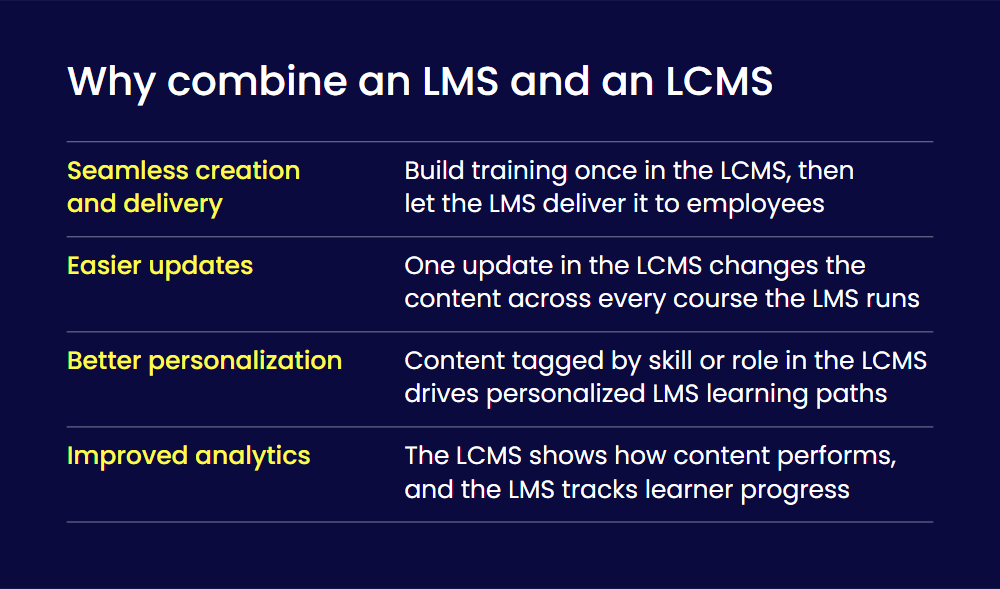
Using both an LMS and an LCMS together can be very helpful for businesses.
By combining them, you can create reusable, flexible content, share it easily with learners, and offer personalized learning experiences. This also gives you better data insights and makes it easier to scale your training programs. So, let’s go into further detail about the benefits of this combination:
Seamless content creation and delivery
Your team can create all training materials in the LCMS, which acts as a central library for reusable content. The LMS then delivers that content to your employees. For example, the LMS can automatically assign a cybersecurity course built in the LCMS to different departments.
Easier to maintain and update content regularly
A single update in the LCMS can change content across many courses at once. The LMS ensures these updates are instantly reflected across the system. For instance, when a flexible working policy is updated in the LCMS, the LMS can push the new version to all relevant training modules.
Better user personalization
When a business creates content in the LCMS, it can tag it by skill or role. The LMS can use these tags to create a personalized learning path for each user. For instance, a new employee might receive introductory materials from the LCMS. But a new manager could receive leadership development training in addition to the standard introductory modules.
Improved analytics and reporting
You get a much clearer picture of how training is performing when you combine an LMS and an LCMS. The LCMS provides data on the content itself, while the LMS tracks learner progress. For example, the LCMS might indicate that a quiz question is too hard. Then, LMS analytics could confirm that many people are failing that section.
What are the benefits of an LMS?
When you understand what an LMS can do, you see how it saves money and time while making training more flexible.
It keeps all your learning materials in one place, helping employees perform better and stay with your company longer. You also get helpful data to see how well your training is working.
Here are the benefits you need to be aware of:
- Learn anytime, anywhere: Employees can access their training from any device, at a time that works best for them. This is perfect for people who work from home or have busy schedules. It helps them balance their work and personal life without stress.
- Helps new employees settle in faster: An LMS can guide new employees through their first few weeks. They can quickly learn about the company and their new role. This helps them feel like part of the team and start contributing much sooner.
- Can help make learning fun: An LMS can use quizzes, videos, and games to make training more interesting. When companies invest time in learning how their LMS can do this, employees are more motivated to participate and remember what they’ve learned. Things like earning badges or points can make it feel like a friendly competition.
What are the benefits of an LCMS?
You should also understand what an LCMS (Learning Content Management System) can do for you. It helps make managing your digital learning materials easier and reduces costs in the long run.
Let’s dive into its benefits:
- Scalability: Regardless of your organization’s size, an LCMS enables effortless scaling. It supports delivering training to any number of learners without additional overhead. This makes it ideal for growing organizations or those with distributed teams.
- Rapid content creation: An LCMS speeds up training creation through reusable modules and templates. When updates are needed, you can make changes in one place and apply them instantly across all courses. This saves time and keeps content up to date for everyone.
- Automation: Built-in tools such as approvals, roles, and notifications can help manage tasks. Businesses can complete reviews, enrollments, and onboarding faster because the system handles most administrative tasks.
What are the challenges of an LCMS?
Be aware of the challenges of an LCMS before you choose and roll it out. This helps you make better decisions and set it up for long-term success. When you understand its limits, you can plan well and avoid common mistakes.
Take into account these problems before adopting an LCMS:
- Balancing reuse and customization: An LCMS aims to reuse content to save time. But if you reuse too much, the content can feel generic. The challenge is creating flexible content blocks that can adapt to different audiences without starting from scratch every time.
- Keeping content organized: Without strict rules, an LCMS can become a messy digital ecosystem. Teams need clear guidelines for file naming, version management, and content tagging. This requires strong oversight, which can be difficult to maintain.
- Managing team collaboration: When writers, subject matter experts, and designers all work on the same content, it can lead to confusion. A better process requires defining who is responsible for what, setting clear deadlines for feedback, and approvals to prevent bottlenecks.
What are the challenges of an LMS?
Understanding the challenges of using an LMS helps you plan and avoid problems. It also helps you choose the right system and get the most value from your investment.
Be aware of these challenges before implementing an LMS:
- One-size-fits-all training: An LMS course often needs editing before rollout. Most courses are generic, so you need to tailor them to your needs before rollout. If you don’t, the platform will deliver the same content to everyone, regardless of role. This means beginners can get overwhelmed, and experts have to sit through information they already know. This can make the training ineffective for both.
- Linking it within existing software: Connecting the LMS to other systems, such as legacy applications, can be a technical nightmare. This creates data silos and requires administrators to do extensive manual work to keep employee information current.
- Getting people to actually use it: The biggest challenge is that many LMS courses feel like a chore. This doesn’t have to be the case if a company learns to use its interactive elements. But if the training is boring or doesn’t apply to their job, employees just click through to get it done. This leads to low employee engagement and wasted resources.
LMS vs LCMS: Building a holistic learning ecosystem
Understanding the distinction between an LMS and an LCMS is vital for any learning agility strategy. An LMS is like a school where you deliver courses, manage learners, and track their progress. In contrast, an LCMS acts as a library where you create, store, and manage all your learning content.
While they have different jobs, they work brilliantly together. You can use an LCMS to build high-quality, reusable content that an LMS then delivers to your audience. By carefully evaluating their unique training and content-development goals, organizations can confidently choose the right tool. This applies whether it’s an LMS, an LCMS, or an integrated solution that combines the strengths of both.
FAQs
A CMS (content management system) manages general content, such as website pages. An LMS delivers, tracks, and manages training for learners. An LCMS sits between the two: it is a content management system built for learning, where course designers create, store, and reuse training content.
A Learning Management System (LMS) is software that manages and delivers online learning and training. Organizations use it to train new employees, meet compliance requirements, and improve skills. It makes it easy to organize courses and track learners’ progress.
Two examples of an LMS are Rippling LMS and LearnDash. LMS platforms are ideal for structured, formal training such as onboarding, compliance, and skill development.
An LMS (Learning Management System) is software used to deliver and track online training. A QMS (Quality Management System) is a set of rules and processes that ensure products and services meet quality standards. The main difference is that an LMS supports employee learning, while a QMS focuses on consistent processes, quality assurance, and customer satisfaction.
An LMS is a system where training is assigned and delivered from the top down, often for mandatory or compliance purposes. An LXP, on the other hand, lets learners choose and access content themselves, offering personalized, engaging learning. An LMS mainly manages and tracks courses, while an LXP focuses on improving the learner experience by letting them find content that fits their needs and interests.