
13 SAP data migration tools for S/4HANA, by migration phase

Quick Summary
- SAP data migration tools automate extraction, cleansing, transformation, and validation, reducing manual errors at scale.
- 58% of organizations now use automation for SAP migrations and digital transformation projects, up from 43% in 2023, per a November 2024 Precisely and ASUG survey.
- 13 Essential tools span four phases (extract, transform, load, and validate), covering migrations from legacy systems to S/4HANA.
- Choosing the right tool reduces migration risk, protects data integrity, and accelerates cloud and S/4HANA adoption.
- Native SAP tools like Migration Cockpit and LSMW offer structured, object-based paths for moving legacy data into SAP.
SAP data migration tools guide the careful transfer of information into modern SAP systems.
The main ones are SAP’s own: the SAP S/4HANA Migration Cockpit to migrate data into SAP S/4HANA, SAP Data Services to improve the quality of data across the enterprise, and SAP Landscape Transformation to migrate and align data within an existing SAP system landscape.
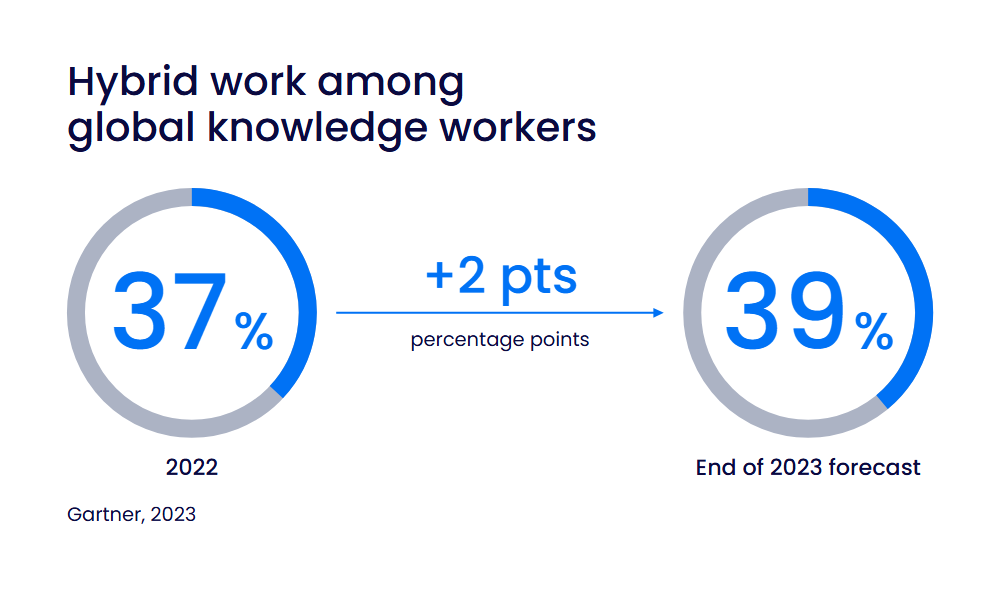
Growing tool adoption reflects demand for speed, accuracy, and ease in moving data across complex landscapes.
Migrating data is crucial to maintain clean financials, ensure accurate supply chains, and provide trusted analytics. SAP data migration tools handle extraction, cleansing, transformation, and validation at scale. They support transitions like S/4HANA migration, master data restructuring, and cloud adoption.
Smart data migration also builds confidence in future SAP-based projects. Choosing the right tool turns a risky data transfer into a basis for digital innovation.
What are SAP data migration tools?
SAP data migration tools help businesses move data safely into SAP systems. They handle tasks such as extracting data from legacy systems, correcting errors, converting formats, and verifying accuracy. These tools reduce mistakes that occur with manual actions, protecting operations and ensuring compliance.
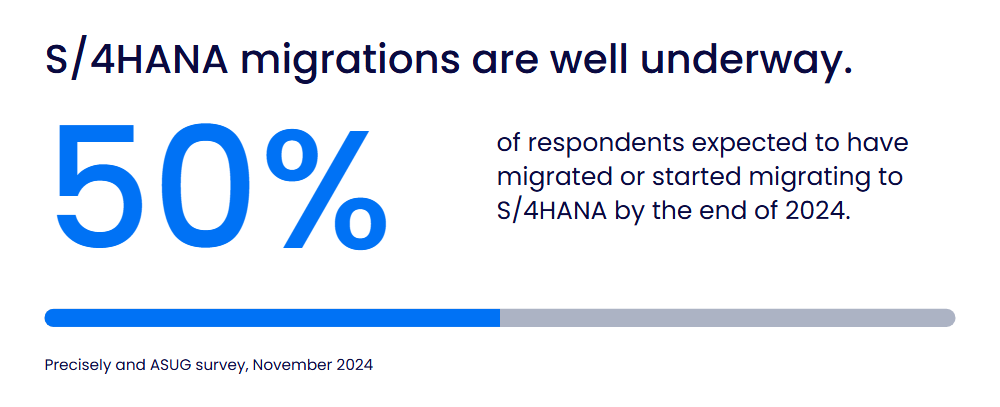
Take SAP’s Migration Cockpit, for example. It is SAP’s recommended tool for the initial data load to SAP S/4HANA. According to a November 2024 Precisely and ASUG survey, 50% of respondents expected to have migrated or started migrating to S/4HANA by the end of 2024.
More organizations are adopting IT process automation to manage complexity and reduce errors during data migration.
This shows how automation is becoming increasingly essential for smoother, faster SAP transitions. It also ensures data integrity, speeds up migration, and lets organizations focus on leveraging new SAP capabilities rather than fixing data-related issues.
Extract phase tools
Our first category is extract phase tools. These tools pull data from source systems, handle large volumes, and ensure data accuracy.
Best suited for complex SAP migrations, they work well with various legacy and third-party systems to prepare for data transformation and loading.
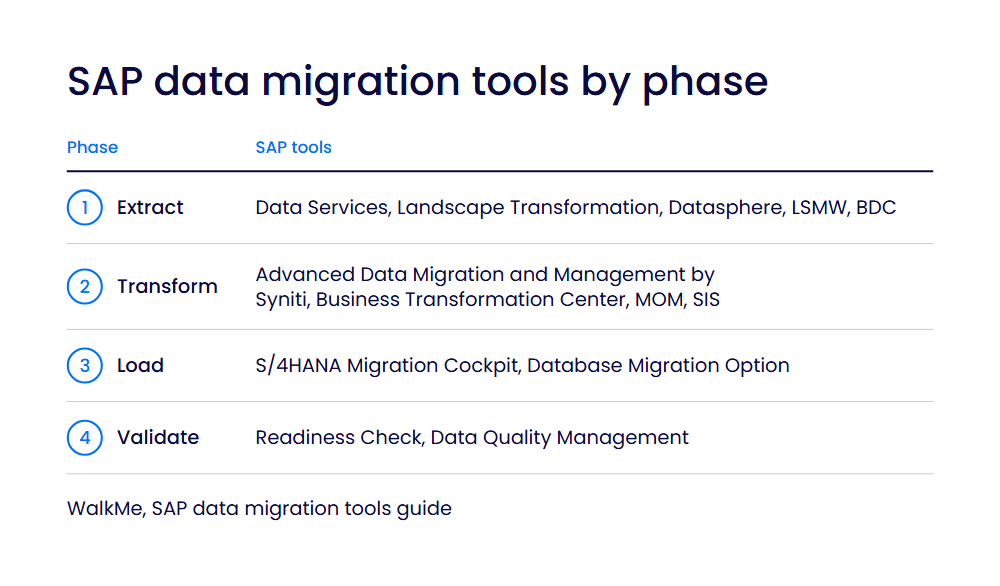
Let’s take a look at the best extract phase tools for SAP data migration:
1. SAP Data Services (SDS)
SAP Data Services (SDS) is a robust tool for data integration, quality, and cleansing that can extract, transform, and load data for SAP migrations. It provides access to data of any size from any source and improves data quality across the enterprise. SDS can also standardize, correct, and match data to reduce duplicates before moving it to SAP S/4HANA or other systems.
It connects to SAP and third-party data sources and targets through built-in, native connectors, and it keeps business rules in a central repository for reuse. Its intuitive user interfaces and support for high-volume needs, through parallel processing, grid computing, and bulk data loading, make it a fit for large-scale enterprise migrations.
2. SAP Landscape Transformation (SLT)
SAP Landscape Transformation Replication Server (SLT) is focused on real-time data replication. It replicates data from SAP or third-party systems to SAP HANA in real time and integrates with software such as SAP S/4HANA for central finance foundation and SAP BW/4HANA. SLT captures change data with near-zero impact and can be deployed without operational disruption.
This software suits organizations that need minimal downtime and continuous data transfer. SLT also offers data and structure transformation features during replication, so it can convert, enrich, and reduce target records. This makes it a good option for moving data from SAP or third-party systems to SAP HANA.
3. SAP Datasphere
SAP Datasphere is a key component of SAP Business Data Cloud that connects SAP and third-party data sources across an open data ecosystem. It connects data sources using batch, streaming, replication, or data federation patterns, while preserving business semantics across hybrid and cloud environments.
Its features cover data integration, data cataloging, semantic modeling, data warehousing, and virtualization in one experience. Teams can unify SAP and third-party data in a single, governed foundation to reduce duplication, and organize it in secure, virtualized spaces with controlled ownership. It also models and harmonizes enterprise data for reuse across domains.
4. Legacy System Migration Workbench (LSMW)
The Legacy System Migration Workbench (LSMW) is a simple SAP tool that supports data migration from legacy (non-SAP) systems to SAP systems. It reads legacy data from spreadsheets or sequential files, converts it into the target format, and migrates it as datasets, known as objects, that are combined according to business criteria.
LSMW imports data through batch input, direct input, BAPIs, or IDocs, and it keeps an action log of everything done to an object. It is a cross-application component of the SAP system built for one-time data transfers (initial data load), with limited support for periodic transfers, making it a dependable choice for companies starting with SAP.
5. Batch Data Communication (BDC)
Batch Data Communication (BDC), which SAP’s documentation calls batch input, automates data entry into SAP by using session data to simulate online entry of transactions and data. It is used primarily for bulk data transfers, such as the one-time import of data from a legacy system into a newly installed SAP system.
BDC processes data in bulk, reducing manual work. Session logs show what happened during an upload, and teams can correct a session and restart it if it is interrupted. Although newer tools offer more options, BDC is also used for periodic data transfers from external or legacy systems that are still in use.
Transform phase tools
The next category is transform phase tools, which make up the second stage of the SAP data migration process.
These tools clean, map, and reshape data to fit the SAP system’s structure and rules. They ensure consistency, catch errors, and help standardize information from different sources.
Let’s take a look at the best transform phase tools for SAP data migration:
6. SAP Advanced Data Migration and Management by Syniti
SAP Advanced Data Migration and Management by Syniti gives teams a faster way to connect, prepare, and validate data before loading it. It uses machine learning and process automation to streamline migration initiatives and maintain high data quality. Teams create project waves, process areas, and migration objects to move data to an SAP application.
It offers a built-in methodology and intuitive templates to simplify complex migration processes, along with data validation, workflow, and approval practices to reduce risk. A project management dashboard shows tasks and schedules, so migration teams and executives stay informed. The solution is deployed in the cloud as software as a service (SaaS) and runs in a web browser.
7. SAP Business Transformation Center
SAP Business Transformation Center is a framework that gives SAP customers an overview of SAP’s standard solutions for data transformation and migration. Its Digital Blueprint provides a data-driven foundation for data analysis and scoping, with documentation for traceability. Its Transformation Approach Finder uses AI to indicate the right transformation path.
Teams can then choose between New Implementation, Selective Data Transition, and System Conversion. With the Lean Selective Data Transition approach, they migrate only future-relevant business data, selected by company code and time slice. The Digital Blueprint can also serve as a template for that scenario or as a basis for the SAP S/4HANA migration cockpit.
8. SAP Migration Object Modeler (MOM)
The SAP S/4HANA Migration Object Modeler (MOM) enables teams to customize migration objects for use in the SAP S/4HANA Migration Cockpit. Instead of creating new objects from scratch, users can add fields to released migration objects. For example, they can map custom source fields to target fields or adjust what is selected from the source system.
This tool gives more flexibility than the predefined migration objects alone. It’s ideal for complex migrations where consistency and control are important. This means teams stay accurate and efficient when transforming data for new SAP environments.
9. SAP Information Steward (SIS)
SAP Information Steward (SIS) supports data profiling, data quality monitoring, and information policy management, so teams can check data before loading it into SAP. It shows data quality metrics in dashboards and scorecards, allowing everyone to see what needs attention. Analysts, data stewards, and IT experts use consistent validation rules to identify error hotspots.
SIS works especially well in industries with strict regulations because it shows data origin and lineage and can audit metadata. By improving data early in the migration process, SIS helps teams anticipate risk and achieve better results after going live with SAP.
Load phase tools
The penultimate category on our list is Load phase tools. These tools move prepared data into SAP target environments quickly, securely, and with minimal disruption.
They’re best suited for teams looking to automate large-scale uploads while preserving data integrity. Whether loading master data or transactional records, these tools ensure a smooth final handover to production.
Let’s take a closer look at the best load phase tools for SAP data migration:
10. SAP S/4HANA Migration Cockpit (SMC)
SAP S/4HANA Migration Cockpit (SMC) simplifies the final handoff as SAP’s recommended tool for the initial data load to SAP S/4HANA, SAP S/4HANA Cloud Private Edition, and SAP S/4HANA Cloud Public Edition. It uses predefined migration objects, such as cost centers.
SMC supports two approaches: migrating data using staging tables, filled from XML templates, CSV files, or other tools, and migrating data directly from an SAP system. Because it was generally designed for the initial data load, SMC also fits well for greenfield implementations where legacy system modernization needs to be restructured. It’s ideal for teams prioritizing speed and SAP-native tools when moving data into live systems during go-live.
11. Database Migration Option (DMO)
Database Migration Option (DMO) of the Software Update Manager (SUM) combines a software update with a database migration for ABAP-based systems. It supports migration to an SAP HANA database and, depending on the scenario, to other database types, including the DMOVE2S4 scenario for the conversion to SAP S/4HANA.
SUM’s R3load tool moves application table content using several R3load pairs that export data from the source database and import it into the target database. The source database keeps running unchanged, so it remains a fallback throughout the process. To reduce downtime, downtime-optimized DMO migrates selected large application tables while the system is still up.
Validate phase tools
Last but not least, our final category is the validation phase tools. These tools are essential for ensuring data accuracy and compliance after migration. They help teams verify that everything is transferred correctly, without disrupting business processes.
Validation is a critical step that builds confidence, reduces post-migration issues, and confirms the system is ready for production use.
Let’s take a closer look at the best validation phase tools for SAP data migration:
12. SAP Readiness Check
The SAP Readiness Check helps you determine if your system is ready to migrate to S/4HANA. It analyzes your existing system and presents the results in a dashboard, with checks such as simplification items, add-on compatibility, and custom code analysis. These insights help teams identify and resolve issues early, avoiding later delays. It also estimates the effort required to get SAP S/4HANA ready.
Because findings can be linked to projects in SAP Cloud ALM, everything stays organized in one place. This tool is especially beneficial for large companies with numerous custom settings or large amounts of data. It gives teams a reliable checkpoint when planning, scoping, and preparing their transition.
13. SAP Data Quality Management (DQM)
SAP Data Quality Management (DQM), part of SAP Master Data Governance, makes sure the data you move is accurate, complete, and consistent. It cleans and matches data, applying profiling, matching, and merging, and it validates records against established business rules.
DQM works with both SAP and third-party data sources, making it ideal for projects with many sources. Teams can define, validate, and monitor business rules, keep data quality rules in a central repository, and run continuous data quality monitoring. Improving data before it goes live, DQM helps elevate the digital experience in your SAP system after the migration.
How we chose these tools
This list covers SAP’s own tools for moving data into SAP systems, grouped by the migration phase each one supports: extract, transform, load, and validate. We checked each entry against the tool’s SAP product, support, or help page in October 2026, and described features in SAP’s own terms.
October 2026 review: every entry re-checked against SAP’s pages. We replaced four tools we could not confirm on a current SAP page (Smart Data Integration, SAP Agile Data Preparation, Smart Data Quality, and SAP Rapid Data Migration) with current SAP tools, and updated links to retired SAP pages.
How to ensure lasting success with SAP data migration tools
SAP data migration is more of a cultural transformation than a checklist.
You’ve explored the tools, mapped the phases, and seen where precision meets possibility.
However, top-performing organizations stand apart in what happens after data migration. Prioritize clean data as a living asset. This means embedding data migration into every future rollout, acquisition, and upgrade. SAP landscapes rarely stay still, and your approach shouldn’t either.
Invest in teams, revisit processes, and always design for what’s next to maintain organizational agility, the true marker of long-term success.
FAQs
Select a tool that fits your project size, complexity, and SAP environment. Prioritize usability, integration with SAP systems, and support for your data sources. Consider features like automation, error handling, and scalability. Additionally, assess vendor support and compatibility with your migration timeline and objectives.
The SAP Readiness Check is a diagnostic tool that assesses your current SAP system before migration. It identifies potential issues, highlights custom code conflicts, and estimates required effort. This insight helps plan a smoother S/4HANA migration, reducing risks and improving project predictability.
SAP Migration Cockpit simplifies data transfer into SAP S/4HANA. It uses predefined migration objects and loads data from staging tables, templates or files, or directly from an SAP system. The tool was designed for the initial load of data into SAP S/4HANA, making it a good fit for new implementations.
SAP Data Services extracts, transforms, and loads data from SAP and third-party sources into SAP environments. It improves data quality by standardizing, correcting, and matching data to reduce duplicates. Automating complex data workflows reduces manual errors and accelerates migration projects while maintaining data integrity.