
Learning in the flow of work: building skills that actually stick in 2026

Most training programs look successful on paper. Most employees are still figuring it out on the job.
Your LMS has never been more complete. Your employees have never been more confused. These two facts are related. Somewhere in your organization right now, someone completed the relevant training last week. The system logged it. Today they’re doing the same task the same way they always have. It isn’t a content problem. It’s a context problem. Learning delivered before the task, away from the tool, with no reinforcement afterward, rarely survives contact with the actual job. Learning in the flow of work is the model built to close that gap.
Where the skills gap actually lives
The conversation about skills gaps tends to focus on supply: organizations can’t find people with the right capabilities, or can’t develop them fast enough as technology changes. That framing is accurate but incomplete.
A significant portion of the skills gap lives inside the existing workforce. Employees have sat through the relevant training. The LMS confirms it. The training was delivered out of context — away from the tools, before the task, with no reinforcement afterward — and the knowledge didn’t transfer.
Research on human memory has been consistent on this point for more than a century. Without reinforcement in context, people forget most of what they learn within 24 to 48 hours of a training session. Corporate programs have largely been designed as if this fact doesn’t apply to them.
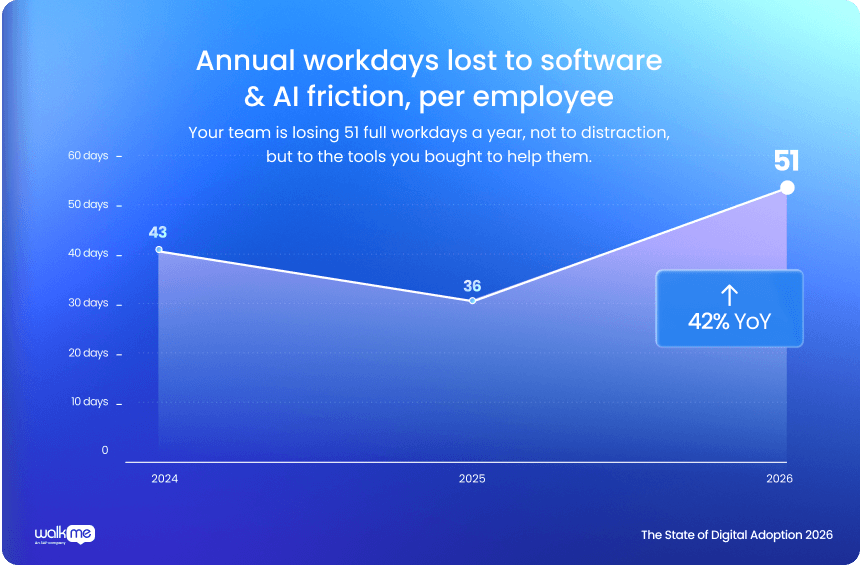
WalkMe’s State of Digital Adoption 2026 puts a number on the downstream cost: employees lose the equivalent of 51 working days per year to technology frustration. A meaningful portion of that is people navigating tools and processes they were never adequately guided through. Training happened. Proficiency didn’t follow.
The pace of change makes this harder every year. When an organization rolls out a new application, updates a process, or introduces a new requirement, it has a narrow window to build genuine competency before productivity costs compound. Most training programs aren’t designed to move that fast.
Why traditional training tools fall short
The LMS was built to manage formal learning: course catalogs, enrollments, completion tracking, compliance records. It does those things well. Where it falls short is the space between the training session and the actual job: the moment when an employee, back at their workstation, needs to apply what they learned inside a real system under real conditions.
The LXP improved on the LMS by adding personalized recommendations and more engaging content experiences. But it still sits outside the workflow. Employees have to go find it, remember to use it, and translate what they learned back into the application where the work is happening.
Neither tool was designed to deliver guidance at the exact moment a skill is needed, inside the system where it needs to be performed. They solve the content delivery and tracking problem. The knowing-doing gap, the space between understanding a concept and performing it reliably, requires something different.
| Capability | LMS | LXP | DAP | Learning Arc |
|---|---|---|---|---|
| Course catalog & completion tracking | ✓ | ✓ | — | ✓ |
| Personalized learning recommendations | Limited | ✓ | — | ✓ |
| In-app guidance at point of need | — | — | ✓ | ✓ |
| Enforced prerequisites & sequencing | Partial | Partial | — | ✓ |
| Embedded assessments inside the workflow | — | — | Limited | ✓ |
| Role-based paths without IT tickets | — | Limited | ✓ | ✓ |
| Authoring speed (source to published) | Weeks | Days | Hours | Hours, AI-assisted |
| AI-native behavioral triggers & reinforcement | — | Limited | Partial | ✓ |
| Completion data pushed to HR system of record | ✓ | ✓ | Partial | ✓ |
The LMS remains the system of record for formal completions. That role isn’t going away, and in-workflow learning tools aren’t designed to replace it. They close the gap the LMS was never built to address: reinforcing knowledge at the moment of application, where it can actually change behavior.
Learning in the flow of work
Josh Bersin introduced the phrase “learning in the flow of work” — also called in-app learning — to describe a model most L&D teams had been working toward without a name for it: rather than pulling employees out of their work to train them, bring the learning to the employee, inside the tools they are already using, at the moment they need it.
In practice, a new hire onboarding into a complex enterprise system gets step-by-step walkthroughs inside the application rather than a separate training portal. A manager completing a sensitive approval workflow gets contextual guidance at each step, triggered by the system itself. An employee preparing for an assessment gets relevant materials surfaced inside the tool where the task is performed.
The structural difference from traditional e-learning is significant. The guidance doesn’t require the employee to remember to seek it out, log into a separate system, or translate what they learned back into the real application. It appears when and where it is needed, reinforces the skill in context, and gets out of the way.
What AI-native in-workflow learning adds
The current generation of in-workflow learning platforms goes further than static walkthroughs. AI-native tools can identify where employees are struggling inside an application, based on what they’re actually doing rather than what they enrolled for, and surface help before the employee asks for it.
For L&D teams, AI-assisted authoring changes the content maintenance equation. Turning source materials like process documents, policy files, and training scripts into structured learning experiences previously took weeks of authoring time. AI-assisted tools compress that to hours and deploy updates without development resources. In environments where systems and processes change frequently, that speed is what makes a program sustainable.
Behavioral reinforcement is the other shift. Rather than a fixed training calendar, AI-native platforms return employees to concepts they haven’t applied recently, based on usage patterns. The learning adapts to what each person actually needs, not what a schedule says they should review.
Unlike tools that were retrofitted with AI features, WalkMe Learning Arc was built AI-native from the ground up. Combined with WalkMe’s proven Digital Adoption capabilities, it creates a powerful combination: guiding employees to do the work confidently while building the deeper skills and proficiency they need to grow. Learn. Do. Grow. All in one flow.
High-impact use cases
In regulated industries, in-app learning is especially powerful for compliance and certification reinforcement. By delivering the right content at the moment of need and generating clear audit trails as a natural outcome, organizations reduce risk while improving actual competency, not just completion rates.
The same principle applies across a much broader set of programs: sales enablement, new system rollouts, leadership development, onboarding, and process changes. Any time an organization needs employees to not just know something but reliably do it inside a real tool, in-workflow learning accelerates the path from training to performance.
In practice: two organizations that made the shift
| Origin Energy 70% reduction in support tickets, tasks completed in under a minute Origin operates in a heavily regulated environment where employees complete external certifications and upload proof to their HR system. The process had become so painful that HR was handling 7,000 support tickets per month for tasks as basic as finding the right course or attaching a document. After implementing in-app guidance and conversational automation, employees self-serve the entire flow. Proficiency that once required days of back-and-forth now takes under a minute. Ticket volume dropped 70% over four years. Full case study |
| FMC Technologies Support requests forecasted to drop 60%, formal training requirements decreased FMC needed to keep employee skills current in a fast-moving industry without scaling their support team. With in-workflow guidance on their InterServ platform, users completed 3,178 guided walkthroughs in a single year. Time-to-competency improved significantly. Their operations manager: “The approach let us introduce new systems without constantly expanding formal training programs.” Skill reinforcement happened inside the tool, not in a classroom. Full case study |
What to look for when evaluating digital learning platforms
- Contextual delivery. Does guidance appear inside the workflow, or does the employee have to seek it out? The harder it is to access, the less it gets used.
- Behavioral triggers. Can the platform surface help based on what an employee is actually doing in the application? Proactive guidance outperforms reactive search.
- AI-native architecture. Was AI built into the platform from the ground up, or added on top of a legacy product? The distinction shows up in authoring speed, reinforcement logic, and how quickly the product improves.
- Role-based personalization. Can different employees see different learning paths without IT involvement? Requirements differ by role, and the platform should reflect that automatically.
- LMS and HRIS integration. Completion data should flow automatically to existing systems of record.
- Reinforcement over time. Does the platform return employees to concepts they haven’t applied recently, based on usage signals? A single traini51 working days per year”ng event is rarely enough to build lasting proficiency.
The bottom line
The organizations closing skills gaps fastest aren’t the ones with the most courses in their LMS. They are the ones guiding employees at the moment of application, inside the tools where work happens, with reinforcement that follows behavior over time.
Faster ramp-up, reduced time-to-competency, skills that transfer to actual performance: these outcomes are achievable. The tools to deliver them exist. The question is whether your current stack can get you there.
| Quick evaluation checklist: 10 questions to ask any vendor Use these to separate tools that genuinely complement your existing stack from tools that add another portal your employees won’t use. ☐ Does guidance appear inside the workflow, or does the employee have to go find it? ☐ Can the platform surface contextual help based on what an employee is actually doing? ☐ How quickly can content be created and updated when systems or processes change? ☐ Can different roles see different learning paths without involving IT? ☐ Are assessments delivered inside the workflow or in a separate system? ☐ Does the platform use behavioral signals to reinforce learning over time? ☐ Does completion data flow automatically to your LMS and HRIS? ☐ Was the platform built AI-native, or retrofitted with AI features? ☐ How does it complement your existing LMS investment? ☐ What does the vendor’s development roadmap look like for the next 18 months? |
| Migrating from legacy digital learning tools? For organizations transitioning from older platforms, WalkMe Learning Arc offers a modern migration path with AI-powered authoring, in-workflow guidance, and support for importing existing content. Learn more about Learning Arc |
| About WalkMe WalkMe helps L&D and HR teams build structured learning experiences inside the enterprise applications their people use every day. Role-specific training paths, in-application assessments, real-time progress tracking, behavioral reinforcement, and AI-assisted authoring: a learning layer that lives inside the workflow, alongside the work itself. See how WalkMe approaches employee learning and proficiency |
Sources
WalkMe State of Digital Adoption 2026
FMC Technologies customer story
Frequently asked questions
A model of employee development in which training and guidance are delivered inside the applications employees already use, at the moment they need them, rather than in a separate portal visited before or after the work. Coined by analyst Josh Bersin, it is the dominant framework for enterprise skills development in 2026 because it addresses the core problem of knowledge transfer: most people forget what they learned before they have a chance to apply it.
An LMS stores content and tracks completions. An LXP adds personalized recommendations and a more engaging content experience. A digital adoption platform delivers guidance inside enterprise applications at the moment of use, based on what employees are actually doing. They serve different functions and most enterprise programs use more than one.
No. The LMS remains the system of record for formal courses, transcripts, certifications, and compliance records. In-workflow learning platforms complement the LMS by delivering what it was never designed to provide: contextual guidance inside the application at the moment a skill needs to be applied.
Skill reinforcement is the practice of returning employees to relevant knowledge after the initial training event, based on how they are actually using a system. Research on human memory shows that knowledge fades quickly without reinforcement in context. Platforms that trigger reinforcement based on behavioral signals, specifically what employees are actually doing rather than what a calendar dictates, produce meaningfully higher retention and faster time-to-competency.
Deliver learning closer to the moment of application. Reinforce concepts in the system where the task is actually performed. Return employees to relevant content based on usage signals, not a fixed schedule. The further the gap between the training event and the real task, the more knowledge fades before it can be applied. Closing that gap is the primary driver of retention improvement.
Compliance and certification reinforcement, new system rollouts, employee onboarding, sales enablement, leadership development, and process change management. Any time an organization needs employees to reliably perform a task inside an enterprise application, in-workflow learning accelerates the path from training to performance.
Time-to-competency, first-attempt pass rates on assessments, support-ticket deflection, and reduction in technology frustration time are the most direct measures. Programs that track these metrics before and after implementation typically show strong returns within the first two quarters. The WalkMe State of Digital Adoption 2026 found employees lose 51 working days per year to technology frustration. That’s the baseline most programs are working to reduce.
The ability to generate structured learning content like walkthroughs, assessments, and knowledge checks, drawn from existing source materials like process documents and policy files. It compresses the time from source material to published learning content from weeks to hours, and enables L&D teams to keep content current as systems and processes evolve, without relying on a development team for every update.
Start with role definitions: what knowledge, skills, and behaviors does each role require at each proficiency level? Map those to specific learning paths and milestones. Then close the gap between the formal learning record and on-the-job performance with in-workflow guidance and behavioral reinforcement. The framework is only as strong as the delivery mechanism behind it.
Contextual guidance delivered inside the workflow, behavioral reinforcement over time, AI-native authoring for fast content updates, role-based personalization without IT dependency, and integration with your existing LMS and HRIS. Platforms built AI-native from the ground up, rather than retrofitted, tend to improve faster and adapt more accurately to individual employee behavior.