
8 Best AI tools for change management in 2026

The best AI tools for change management depend on the part of change you need help with. To guide people through new software and training, consider WalkMe, Axonify, or Whatfix. For answering questions and sharing news during change, Leena AI is a good fit. For planning, Prosci’s Kaiya helps, and for measuring how employees feel, Culture Amp, Microsoft Viva Glint, and Qualtrics Employee Experience fit that job.
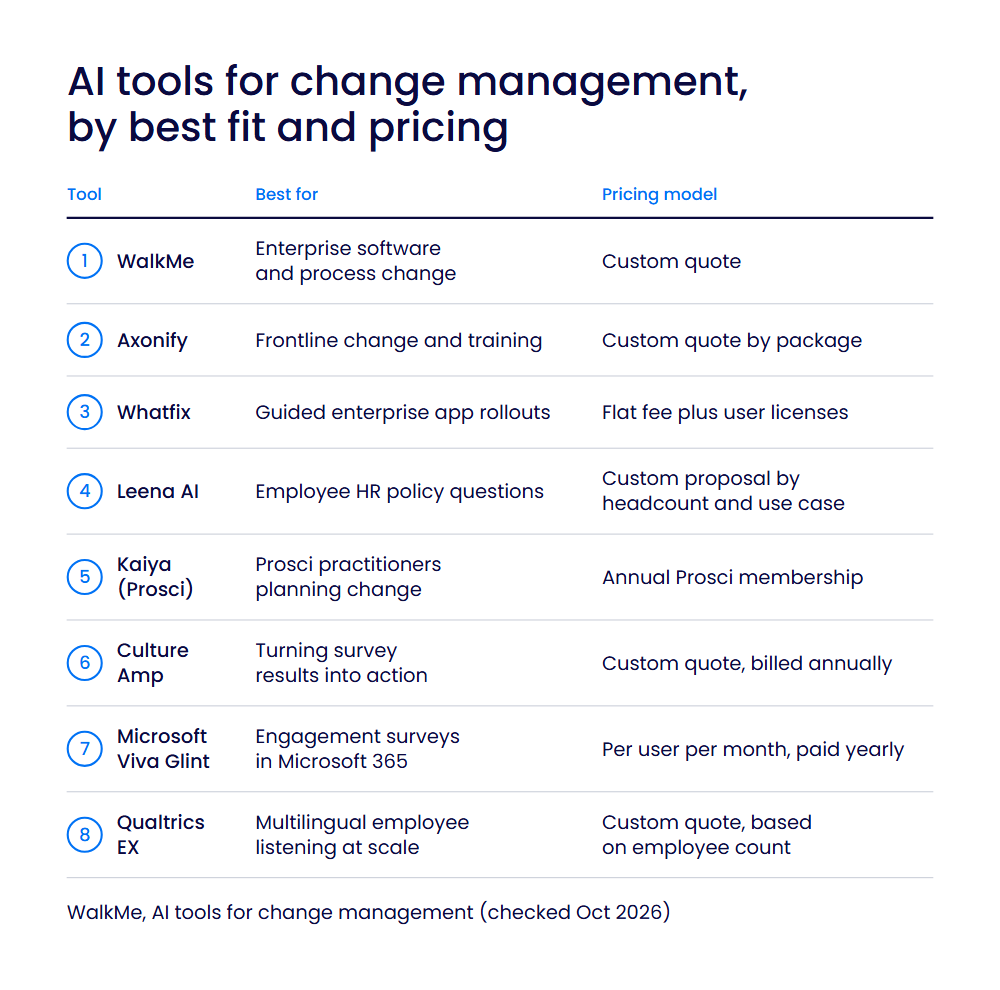
| Tool | Best for | Pricing model |
| WalkMe | Enterprise software and process change | Custom quote |
| Axonify | Frontline change and training | Custom quote by package |
| Whatfix | Guided enterprise app rollouts | Flat fee plus user licenses |
| Leena AI | Employee HR policy questions | Custom proposal by headcount and use case |
| Kaiya (Prosci) | Prosci practitioners planning change | Annual Prosci membership |
| Culture Amp | Turning survey results into action | Custom quote, billed annually |
| Microsoft Viva Glint | Engagement surveys in Microsoft 365 | Per user per month, paid yearly |
| Qualtrics Employee Experience (EX) | Multilingual employee listening at scale | Custom quote, based on employee count |
These tools suit change, HR, learning, and transformation leaders who want AI tools that help people through change. For the wider question of managing change when AI arrives, see our guide to AI change management.
AI for digital adoption and training
AI in these tools guides people inside the software and processes they’re adopting, and builds training faster.
1. WalkMe
Best for: Enterprises managing software and process change across many applications.
What it is: WalkMe, an SAP company, is an AI adoption platform built around its AI-enabled Action Bar, which reads context across the whole screen and automatically suggests the next best action. Its Contextual AI Assistance puts AI-powered guidance inside the applications people already use, on web, desktop, and mobile.
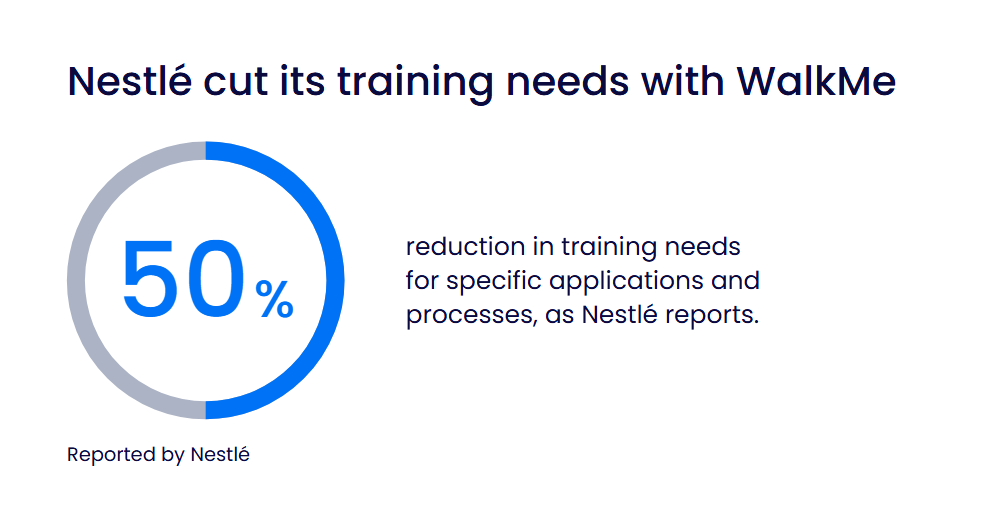
Nestlé’s next SAP SuccessFactors rollout with WalkMe raised task completion rates by 200%, and Nestlé reports a 50% reduction in training needs for specific applications and processes.
Key features:
- AI-Enabled Action Bar: reads the screen and offers the next best action inside the applications employees already use.
- AI authoring: builders describe content in plain language, and WalkMe builds it, from new content to bulk edits.
- AI insights: teams ask a question in plain language and get back a table, answer, or visualization.
- In-app guidance and automation: personalized guidance and automations meet users at the point of friction.
- Usage analytics: gives visibility into web app usage and adoption, down to the user level, so change teams can see where adoption stalls.
Limitations:. On web apps where you can’t add WalkMe’s code, it runs through a browser extension that IT deploys to each user.
Pricing: Custom quote; no free plan or trial listed on WalkMe’s pricing page (updated Oct 2026).
2. Axonify
Best for: Frontline teams that need to learn about changes quickly.
What it is: Axonify is an AI-powered frontline enablement platform. Organizations use it as a hub to drive change, deliver communications, and equip their teams to execute with confidence. Its AI features include Max Assistant, Max Coach, Co-Creator, and agentic AI.
Key features:
- Co-Creator: turns raw inputs into training in hours, not weeks.
- Max Assistant: gives workers instant answers on the job in more than 60 languages.
- Agentic AI: surfaces gaps before they hit the floor and recommends the action to close them.
- Frontline communications: reaches every shift with announcements, location channels, and two-way messaging.
Limitations: Pricing isn’t published. Max Coach is available only in the Pro and Premium plans. It’s built for frontline teams on the floor, in stores, and on routes, not desk-based software rollouts.
Pricing: Custom quote for the Core, Pro, or Premium package, based on team size, locations, and features; no free plan or trial listed (checked Oct 2026).
3. Whatfix
Best for: Organizations rolling out and training people on enterprise applications.
What it is: Whatfix guides users inside applications, provides simulation training, and tracks adoption across enterprise software. It uses AI agents to author and update content, adapt guidance based on user behavior, and turn insights into new experiences.
Key features:
- AI authoring: AI agents author and update in-app content.
- Adaptive guidance: AI adapts in-app guidance based on user behavior.
- Mirror: prepares users before go-live with simulation training and roleplay.
- Adoption analytics: tracks engagement and identifies friction points as employees use new systems and processes.
Limitations: Some features depend on the plan; for example, the Standard plan is limited to 2 integrations. Web delivery can rely on browser extensions that IT deploys to all users.
Pricing: Custom quote made up of a flat per-application fee plus user license fees, across the Standard, Premium, and Enterprise plans; a free trial is available (checked Oct 2026).
AI for change communication and knowledge
Leena AI uses AI to answer employees’ questions and keep them informed while things change.
4. Leena AI
Best for: HR teams answering employee policy questions at scale.
What it is: Leena AI is an enterprise AI platform with prebuilt AI colleagues for HR, IT, and finance. Its HR AI colleague handles onboarding, leave, payroll, and policy questions. It can also auto-create function-specific announcements.
Key features:
- HR AI colleague: answers policy questions and closes Tier-1 HR requests such as leave, letters, benefits, and payroll.
- Targeted announcements: keeps an announcement calendar and collects feedback through polls or surveys.
- Languages: works in more than 100 languages.
- Integrations: more than 200 pre-built enterprise integrations.
Limitations: No public pricing, and AI Colleagues usage is billed on top of the platform fee, so costs vary. On average, customers go live in 45 days.
Pricing: Custom proposal based on headcount, use cases, and volumes: the Universal Assistant is a flat license per employee per year, and the AI Colleagues Platform is a platform fee plus usage (checked Oct 2026).
AI for change planning
With AI, Kaiya helps practitioners plan change and prepare the accompanying messages.
5. Kaiya (Prosci)
Best for: Prosci-certified practitioners planning change.
What it is: Kaiya is Prosci’s AI-powered change management assistant. It gives on-demand guidance and answers drawn from Prosci’s knowledge base, based on more than 25 years of Prosci research and methodology.
Key features:
- Change blueprints: builds guided change blueprints for a project.
- Change messages: drafts key messages and customizes them for different audiences.
- Resistance management: develops resistance management tactics.
Limitations: The Essentials and Premier memberships require completion of the Prosci Change Management Practitioner Program. Essentials includes 20 prompts a month; unlimited prompts require Premier. Answers come from Prosci’s knowledge base, not your company’s own data.
Pricing: Included in an annual Prosci membership, Essentials or Premier (checked Oct 2026).
AI for employee sentiment and engagement
These tools use AI to measure how employees feel about change and turn feedback into action.
6. Culture Amp
Best for: Managers turning survey results into action plans.
What it is: Culture Amp Engage combines employee surveys with Culture Amp AI. Pulse surveys track the impact of organizational changes, and AI Coach drafts clear messages for each audience and channel.
Key features:
- AI comment summaries: summarizes comments by question into positive, negative, and neutral themes, with representative comments.
- Sentiment analysis: breaks survey comments down into sentiments, topics, and trends.
- AI Coach: surfaces key themes from survey data, suggests next steps, and drafts communications.
- Survey templates: more than 40 ready-to-use templates.
Limitations: AI comment summaries need at least 5 meaningful comments per question and work on Engagement surveys only. They aren’t included in exports.
Pricing: Custom quote; pricing depends on the number of employees, product, and service tier, billed annually (checked Oct 2026).
7. Microsoft Viva Glint
Best for: Microsoft 365 organizations running engagement surveys.
What it is: Microsoft Viva Glint is Microsoft’s employee survey platform, formerly LinkedIn Glint. It runs engagement, onboarding, exit, change management, and 360 feedback surveys, and Copilot in Viva Glint helps leaders quickly identify themes and act on employee feedback.
Key features:
- Copilot Highlights: summarizes quantitative survey results.
- Comment summarization: summarizes up to 8,000 of the most relevant comments and groups them into up to 10 themes.
- Languages: supports more than 60 languages.
- No extra Copilot license: Copilot in Viva Glint is separate from the Microsoft Copilot license and comes with a Viva Glint or Microsoft Viva license.
Limitations: There’s a 50-seat license minimum. Copilot can’t currently compare comments between surveys. Viva needs an eligible Microsoft 365, Office 365, or SharePoint license.
Pricing: Per user per month, paid yearly; sold on its own or as part of Viva Workplace Analytics and Employee Feedback or the Viva Suite (checked Oct 2026).
8. Qualtrics Employee Experience (EX)
Best for: Large organizations listening to employees in several languages.
What it is: Qualtrics Employee Experience gives managers at every level AI-surfaced recommendations on the next best steps to drive engagement and productivity. Its AI summarizes open feedback for engagement, lifecycle, pulse, and ad hoc research projects, which helps teams see how change is landing.
Key features:
- AI comment summaries: creates summaries and highlights key topics in English, German, French, Spanish, and Japanese.
- Personalized Action Recommendations: uses AI to help managers and leaders identify areas of improvement and take action.
- Adaptive follow-up questions (public preview): uses AI to create follow-up questions based on what respondents write.
- Qualtrics Assist: a dashboard assistant that uses AI to guide managers, HR analysts, and company leaders through every stage of results analysis.
Limitations: Comment summaries are only available on Qualtrics’ new simplified pricing and packaging plans for Employee Experience. Topics with 300 or more comments are summarized from a random sample of 300.
Pricing: Custom quote; Employee Experience pricing is based on employee count (checked Oct 2026).
How to choose AI tools for change and transformation management
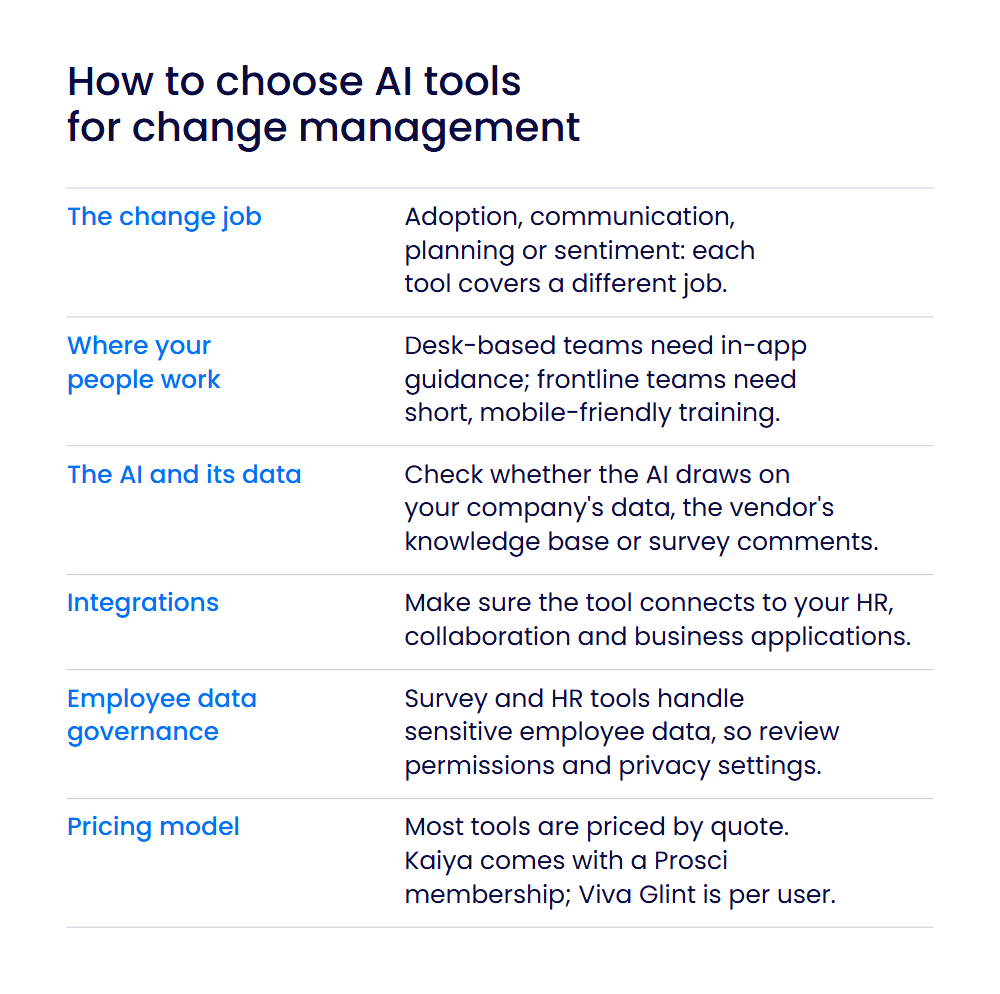
Start with the part of change you need help with, then see how each tool fits how your people work. Transformation management AI tools cover different jobs, so many organizations will need more than one.
- The change job. Adoption and training tools guide people inside new software. Communication tools answer questions and share news. Planning tools help build change plans and draft messages. Sentiment tools show how change is landing.
- Where your people work. Desk-based teams on enterprise applications need in-app guidance, while frontline teams need short, mobile-friendly training.
- The AI and its data. Check what each AI feature draws on: your company’s data, the vendor’s knowledge base, or survey comments.
- Integrations. Make sure the tool connects to your HR, collaboration, and business applications.
- Employee data governance. Survey and HR tools handle sensitive employee data, so review permissions and privacy settings.
- Pricing model. Most tools here are priced by quote. Kaiya comes with an annual Prosci membership, and Viva Glint is licensed per user, paid yearly.
If you’re comparing change management software more broadly, see our guide to IT change management software. For planning methods, our overview of change management frameworks explains the main models, and our guide to change management activities offers practical communication ideas.
How we chose these tools
We compared each tool on these criteria:
- a documented AI capability for a change management job,
- fit with how organizations run change (adoption, communication, planning, sentiment),
- integrations,
- governance of employee data,
- pricing transparency.
Features, plans, and pricing models come from each vendor’s own product, pricing, documentation, help, and customer-story pages. We checked every fact in October 2026. IT service management change-control tools and general AI assistants are out of scope. WalkMe is listed first, so its group comes first; the other groups, and the tools within each group, are in alphabetical order.
WalkMe is our product. We’ve included it alongside other options and described each against the same criteria.
Make AI change stick with the right tools
AI only pays off when people change how they work. AI tools for change management cover different parts of that job: guiding people, informing them, planning change, and listening to them. Most organizations will combine a few.
WalkMe focuses on the moment of work itself. It puts AI-powered guidance inside the applications people use, so they can adopt new processes and AI capabilities without leaving their work.
Frequently Asked Questions
AI helps change teams at several points. In-app AI guides employees through new software, and training tools build content faster. Assistants answer employees’ questions and draft announcements. Planning tools help build change plans and draft messages, and survey tools summarize comments to show how people feel. Together, they help teams spot problems early and respond before resistance grows.
It depends on the job. For adoption and training, options include WalkMe, Axonify, and Whatfix. For communication, Leena AI answers questions and shares updates. For planning, Prosci’s Kaiya helps draft change plans. For sentiment, Culture Amp, Microsoft Viva Glint, and Qualtrics Employee Experience measure how change is landing.
WalkMe, Axonify, Whatfix, Leena AI, and Culture Amp do both. Axonify trains frontline workers and reaches every shift with announcements. WalkMe and Whatfix guide people inside applications while change happens. Leena AI writes targeted announcements and answers HR questions. Culture Amp’s AI Coach drafts messages for each audience after a survey, which connects listening with communication.
AI supports change in four main ways. It guides people inside the tools they’re adopting, so they learn while they work. It answers questions and drafts communications at scale. It speeds up planning tasks such as building change plans. It summarizes employee feedback so leaders see where support is needed and can act quickly.
Some tools help you rehearse changes before they go live. Whatfix Mirror prepares users before go-live with simulation training and roleplay, so employees can practice new processes safely.
Behavior changes when people get in-the-moment support and leaders act on feedback. In-app guidance from WalkMe or Whatfix helps people form new habits inside their daily tools. Survey tools such as Culture Amp, Microsoft Viva Glint, and Qualtrics Employee Experience show how attitudes are shifting. Prosci’s Kaiya helps practitioners plan resistance management.