
Software pricing models: Definition, models, & considerations

Pricing models shape far more of the software experience than most realise. Many organizations focus on initial discounts, yet software pricing has layers that only make sense when you look at the whole picture.
Software now accounts for far more of the average IT budget than it did a few years ago, reaching 50% in 2024. One reason is the increasing variety of pricing models, which makes it harder to predict total costs and compare options.
Understanding them is the only way to ensure long-term IT cost savings. And in a world where spending can rise quickly without clear guardrails, a tight grasp of how each model works is needed before any commitments are made.
This article explores software pricing models, showing how each affects costs, usage, and long-term value to help make smarter software purchasing decisions.
What is a software pricing model?
A software pricing model is the framework that determines how access is charged, whether that charge is tied to time, usage, or the number of users. A good pricing model makes it clear what’s included, what matures over time, and what adds extra charges.
Once you understand the structure, you can see how software pricing shapes long-term spending far more than an initial quote ever could. Identifying the right model is important and could mean the difference between accurate cost predictions and unexpected expenses.
Beyond costs, pricing models shape how people interact with software, which in turn influences digital adoption and broader efforts to improve digital efficiency.
When exploring different options, consider how each affects outlay and team adoption to see which keeps spending predictable and which could lead to surprises.
What should you consider when evaluating software pricing models?

The real value of software doesn’t come from its features or functionality, but from understanding how pricing models influence both cost and usage. Use the following considerations to evaluate software pricing models:
Market and target audience
Understanding who will use the software and in what context is the first objective. Pricing models interact with adoption patterns, team size, and usage intensity. A model that fits one audience may misalign with another, so evaluating the market ensures the cost structure supports needs and encourages effective software use.
Product functionality and value
The price must reflect what the software delivers. Remember that features alone don’t guarantee value. Digging a layer deeper reveals how software can be implemented and scaled, which positively impacts ROI. Assessing functionality alongside pricing clarifies whether the model is efficient and maximizes impact without creating unnecessary overhead or friction.
Competitor pricing and market trends
Knowing how similar solutions are priced provides context for your decisions. Market trends can show shifts toward usage-based or subscription models, influencing budgeting and negotiation strategies. Evaluating competitor approaches helps anticipate cost changes, avoid overpaying, and determine a model that aligns with broader industry practices and expectations.
What are the different types of software pricing models?
Before diving into the various software pricing models, the table below highlights the pros and cons of each, giving a clear snapshot to guide smarter purchasing decisions:
| Pricing Model | Pros | Cons |
| Bundle pricing | Encourages adoption of multiple products | May force customers to pay for unwanted items |
| Competition-based pricing | Easy to benchmark, stays competitive | May ignore your actual costs or value |
| Cost plus pricing | Simple to calculate, covers costs | Doesn’t reflect market value or demand |
| Dynamic pricing | Maximizes revenue based on demand | Can confuse customers, unpredictable |
| Freemium pricing | Attracts users easily, low entry barrier | Few free users convert to paying customers |
| Pay what you want pricing | Flexible for customers, can build goodwill | Risk of very low revenue |
| Subscription pricing | Predictable recurring revenue, easy budgeting | Can discourage occasional users |
| Tiered pricing | Offers options for different needs and budgets | Can be confusing, some tiers underused |
| Usage-based pricing | Customers pay for what they actually use | Costs can fluctuate, harder to predict |
| Value-based pricing | Aligns price with customer perceived value | Hard to measure value, requires research |
1. Bundle pricing
Bundle pricing packages multiple products or services together at a single cost, making it easier to access complementary tools at once. Consider whether all included features will actually be used, as extra elements may increase costs without adding value. Evaluating how each component aligns with team needs ensures efficient spending and prevents paying for functionality that isn’t required.
Example: A software company might sell a productivity suite that includes project management, messaging, and file-sharing tools. A marketing team sees value in all three. A smaller team using only messaging must consider whether the bundled price justifies the extra features.
2. Competition-based pricing
From a practical perspective, the competition-based model sets prices based on what similar software in the market charges. While it can make comparisons easier, it may overlook unique features or internal needs. Aligning too closely with competitors can also lead to paying for features you don’t need or missing opportunities for better value elsewhere.
Example: Comparing cloud storage, two similar options stand out. One is slightly more expensive but includes advanced tools, like analytics capabilities. Rather than choosing the lowest price, the plan that delivers the most impact and supports longer-term use is selected.
3. Cost plus pricing
Cost-plus pricing sets the software price based on production costs plus a fixed margin. While predictable, buyers may find the price doesn’t match the value they receive, meaning they could pay more than necessary for features or capacity they need. This model is great for those who value transparency and accurate budgeting, as it shows how the price is built and ensures there are no hidden costs.
Example: Considering new reporting software, the price is based on development costs plus a fixed margin. The features to be used are weighed against the cost. This helps determine whether the tool delivers real value or if another solution offers the same capabilities at a better price.
4. Dynamic pricing
Dynamic pricing adjusts costs based on demand, time, or other market factors. Unlike fixed models, it reflects real-time conditions and allows prices to rise when demand is high and fall when demand is low. This does mean costs can fluctuate, creating opportunities to save but also potential surprises if usage spikes.
Example: Looking at cloud software, subscription fees are higher during peak usage months. Monitoring patterns and planning usage strategically enables you to decide when to scale or pause services. This approach ensures payment for only what is needed, avoiding unexpected budget spikes.
5. Freemium pricing
Freemium pricing lets you access a basic version of software for free, with the option to upgrade for more advanced features. Its appeal lies in the ability to try the product without a financial commitment, making it easier to test fit and usability before investing. In the past five years, freemium has become a popular strategy for software adoption, attracting users who can try it risk-free before committing to a paid plan.
Example: Testing a collaboration app begins with the free plan. The features that the team actually uses versus those that are unnecessary become clear. Hands-on experience supports confident decisions about upgrading, ensuring investment aligns with needs and avoiding the cost of unused features.
6. Pay What You Want pricing
Pay What You Want pricing lets users set their own price for a product or service. It shifts control to the user, offering flexibility while making perceived value a key factor. Depending on demand and trust, costs can range from surprisingly low to unexpectedly generous.
Example: A team exploring a productivity tool sees the option to pay any amount and assess what they’d reasonably invest based on expected usage and team size. This allows them to test the software risk-free while setting a price that aligns with the value of their digital workflows.
7. Subscription pricing
One of the most common pricing models is subscription pricing, in which access to software is granted for a recurring fee, typically monthly or annually. This model provides predictable costs and continuous updates, while requiring teams to match ongoing payments with actual usage to ensure spending remains efficient.
Example: When evaluating a project management tool review, you look at both monthly and annual plans. Comparing anticipated usage with subscription levels helps select a plan that provides key features without paying for unnecessary capacity. This ensures digital technology investments stay aligned with budget constraints.
8. Tiered pricing
Another fairly common entry, tiered pricing offers several packages at different levels, each including varying features or capacities. It provides flexibility for teams of mixed sizes or usage needs, but can be confusing when tiers don’t clearly align with requirements. For this model in particular, understanding the differences is key to getting value.
Example: When comparing a marketing automation tool, reviews are organized into three tiers: basic, standard, and premium. They analyze which features the team will use and pick the tier that matches their needs. This assures no overpayments for unused capabilities while gaining access to productivity essentials.
9. Usage-based pricing
Our penultimate entry, usage-based pricing, charges based on how much a product is used rather than a fixed fee. It offers a cost-efficient approach, provided usage is monitored closely. Teams with fluctuating activity gain the most when they can anticipate or manage their consumption based on usage.
Example: In a cloud analytics platform, fees rise as the amount of data processed increases. Tracking usage allows planning around high-demand periods, so you only pay for what the team uses. This keeps costs aligned with activity while still providing full access to the platform’s capabilities.
10. Value-based pricing
Value-based pricing sets cost based on the benefit the software delivers rather than production or market rates. It focuses on what the tool enables teams to achieve, helping ensure investments are focused, rather than driven by arbitrary numbers.
Example: Consider a reporting tool; assess the time it saves and the clarity it brings to decision-making. Even at a higher price than other options, the efficiency and outcomes it delivers make the investment worthwhile. Value-based pricing guarantees spending reflects the software’s true contribution to productivity and business results.
How to compare software pricing models
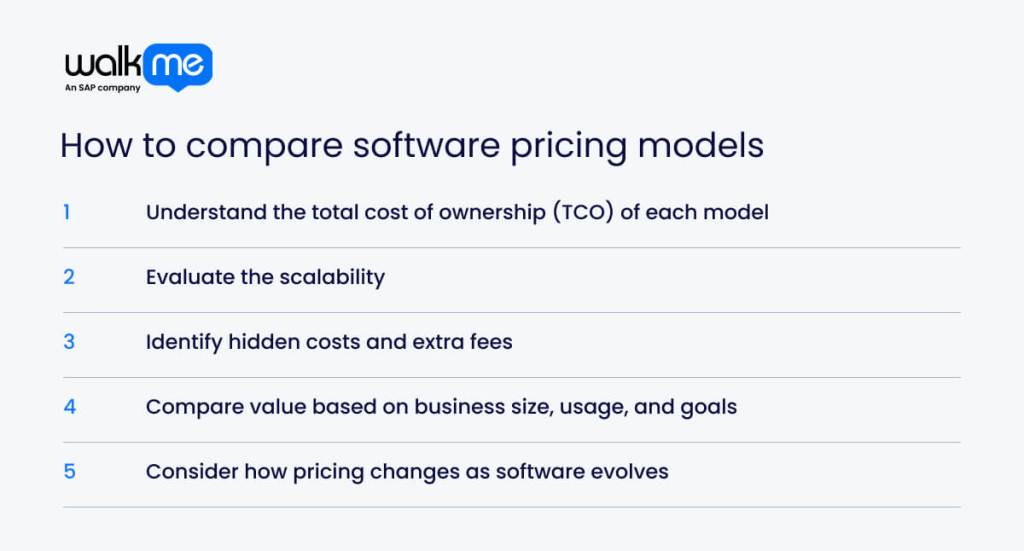
Comparing software pricing models can quickly become overwhelming. Breaking the process down into the following steps will help ease the burden of making purchasing decisions:
Understand the total cost of ownership (TCO) of each model
The table below outlines the key factors of Total Cost of Ownership (TCO) that can be applied to any software pricing model:
| Factor | What to Look For | Why It Matters |
| Initial Cost | Upfront fees or setup charges | Shows immediate financial impact and budget requirements |
| Recurring Costs | Subscriptions, maintenance, or support fees | Helps forecast ongoing expenses over time |
| Usage Costs | Fees tied to volume, users, or activity | Reveals potential spikes or savings depending on usage |
| Hidden Fees | Extra charges for add-ons, upgrades, or support | Prevents surprises and unplanned budget overruns |
| Implementation Costs | Time and resources needed to deploy | Ensures you account for full effort and internal workload |
| Scalability | How costs change as the team or usage grows | Helps plan for growth without overspending |
Evaluate the scalability
Evaluate scalability by looking at how your team and processes might grow over time and how the software pricing model responds to that growth. Look for:
- Flexible access: Can you easily add or remove users as needed?
- Feature expansion: Will higher usage unlock new costs?
- Capacity alignment: Does the plan match how much your team will realistically use?
Understanding growth patterns helps choose a model that scales with operations. This also means no overpayments for unused capacity or facing sudden spikes, keeping spending to a minimum.
Identify hidden costs and extra fees
To uncover the real cost of software, you need to account for all hidden costs. These typically include:
- Extra features or add-ons
- Premium support or training fees
- Usage charges per user, action, or data
- Integration or plugin costs
- Implementation efforts
List each potential hidden cost for the software you’re considering and estimate its impact on your budget to reveal the true total cost.
Compare value based on business size, usage, and goals
What businesses fail to recognize is that comparing software value is more about fit than price:
Assess how a software’s features and pricing align with your team’s size and day-to-day usage. Small teams may only need core functions, while larger teams require scalable solutions that won’t break the budget.
All investments should maximize software ROI, so be sure to track usage shifts and account for growth projections.
Consider how pricing changes as software evolves
One thing to keep in mind is that software costs are not fixed. Updates, new features, and service expansions can shift pricing over time. To anticipate changes, follow this three-step approach:
- Review vendor roadmaps to identify planned features, modules, or tiers that could affect costs.
- Project usage growth to estimate how team size, workflow complexity, or data volume might affect future charges.
- Align with goals by mapping potential costs to the expected benefits and outcomes.
You can visualize cost evolution with a simple timeline or graph to track how pricing grows alongside value.
Making informed software purchasing decisions
Making informed software purchasing decisions is easier said than done and involves understanding the nuances of each model and the benefits they bring.
Pricing models are always changing, which affects how software is delivered. Taking this into consideration and aligning strategic needs are the only ways to stay on top of rising software prices.
But how do you make an informed software purchase? Given that models are constantly shifting to match the changing demands of an already saturated user base, the best way to evaluate each model is through thorough research.
It’s easy for businesses to lose sight of tangible needs when they focus on discounted prices or low setup fees.
Those who align their pricing research with their digital transformation strategy will choose a model that is practical, sustainable, and delivers long-term value.
FAQs
SaaS usually charges monthly or yearly for access, while traditional software often requires a one-time payment. SaaS also updates automatically and grows with your team, whereas conventional software may need manual upgrades. Knowing this helps plan expenditures and pick a model that genuinely fits.
Focusing only on upfront costs, ignoring extra fees, and failing to consider how your team uses the software are common mistakes. Teams also overlook future growth or integration needs. Checking usage, hidden costs, and scalability first makes sure the software works without overspending.
As teams grow, some models charge per user or per action, which can quickly drive up costs. Without planning, software spending can balloon. Understanding how the model changes with more users or data ensures you pick one that scales without surprise bills.