10 Best Digital Adoption Solutions in 2026

Digital adoption solutions are software that sits on top of your business applications and guides people through tasks inside them. They’re also called digital adoption platforms (DAPs) or DAP solutions.
The best digital adoption solutions for you depend on which applications you need to cover. For guidance, automation, and AI assistance across many enterprise applications, compare WalkMe, Whatfix, and Lemon Learning.
For product analytics with in-app guides, look at Pendo. For Oracle applications, consider Oracle Guided Learning. For training content and documentation, look at ClickLearn and uPerform.
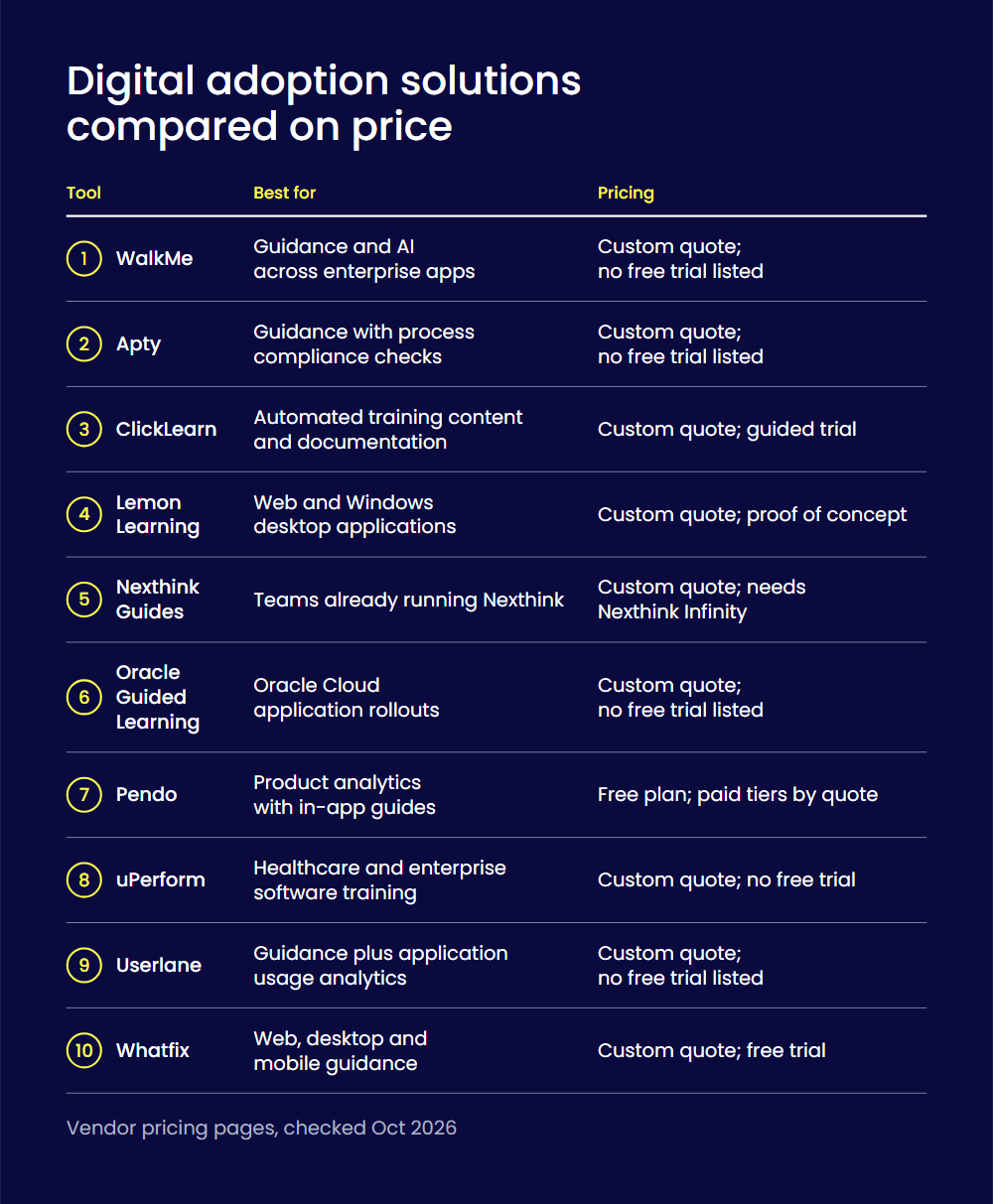
| Tool | Best for | Pricing |
| WalkMe | Guidance and AI across enterprise apps | Custom quote; no free trial listed |
| Apty | Guidance with process compliance checks | Custom quote; no free trial listed |
| ClickLearn | Automated training content and documentation | Custom quote; guided trial |
| Lemon Learning | Web and Windows desktop applications | Custom quote; proof of concept |
| Nexthink Guides | Teams already running Nexthink | Custom quote; needs Nexthink Infinity |
| Oracle Guided Learning | Oracle Cloud application rollouts | Custom quote; no free trial listed |
| Pendo | Product analytics with in-app guides | Free plan; paid tiers by quote |
| uPerform | Healthcare and enterprise software training | Custom quote; no free trial |
| Userlane | Guidance plus application usage analytics | Custom quote; no free trial listed |
| Whatfix | Web, desktop and mobile guidance | Custom quote; free trial |
Enterprises keep buying software and AI tools, yet the value depends on people using them well. That’s the adoption gap, and it rarely comes from the software alone. People get stuck inside the application, in the middle of a task. A digital adoption solution closes that gap where it opens: on the screen, at the moment of work.
This list is for enterprise IT, HR, operations, and learning teams choosing a solution for employee-facing or customer-facing software. If you only need onboarding inside your own SaaS product, see our list of user onboarding tools.
The 10 best digital adoption solutions
WalkMe comes first because it’s our product. The other nine follow in alphabetical order.
1. WalkMe
Best for: Large enterprises that need guidance, automation, and AI assistance across many applications, for employees or customers.
What it is: WalkMe is a digital adoption platform that overlays your applications with real-time context, cross-application workflows, and automation. Its action bar reads the screen and suggests the next best action, so help arrives before people ask for it. WalkMe works on web, desktop, and mobile applications, and it is part of SAP. In the IBM customer story, IBM reports 6X higher user retention and 4X better conversion rates from trials to subscriptions.
Key features:
- Action bar across applications: One assistant appears in every application, so people don’t learn a new help system for each tool.
- In-app guidance: Interactive flows guide people through multi-step tasks click by click, in real time.
- Automation: WalkMe can click buttons, select menu items, and fill in forms, which cuts time spent on repetitive processes.
- Adoption analytics: Usage data shows where people stall or drop off, within and across applications.
- Security: WalkMe publishes its certifications, including SOC 2 Type 2 and ISO/IEC 27001, on its trust page.
Limitations: Pricing isn’t published; you request a quote. Each application is set up as its own WalkMe system, and your contract sets how many systems you can create. Mobile apps need the WalkMe Mobile SDK built into the app.
Pricing: Custom quote; no free plan or free trial is listed (checked Oct 2026).
Rating: 4.5/5 on G2’s WalkMe reviews, 582 reviews (checked Oct 2026).
2. Apty
Best for: Enterprises that want in-app guidance plus checks to ensure people follow the process correctly.
What it is: Apty is a digital adoption platform that aims to improve how work gets done inside enterprise applications. It combines guidance, validation, and analytics, and it supports Salesforce, Workday, ServiceNow, Microsoft Dynamics, Coupa, and Infor. Apty sells two products: Apty AI, the adoption platform, and Apty PULSE, which reports on software use across the organization.
Key features:
- In-app guidance: Contextual walkthroughs, tooltips, and announcements help people finish tasks without leaving the application.
- Workflow validations: Checks on data entry and procedure steps catch mistakes before you save a record.
- Analytics: Workflow and page-level analytics show where a process slows down.
- AI detection: Apty’s AI watches how work happens and flags skipped steps, friction, and deviations.
- Apty PULSE: A dashboard provides a single view of software use across your organization.
Limitations: Pricing isn’t published. On-premise authoring, white-labeling, and professional services are add-ons. Apty’s public help center couldn’t be read during our check, so confirm browser and desktop support with the vendor.
Pricing: Custom quote, scoped by users, applications, and deployment needs, with no feature-based tiers. No free trial is listed (checked Oct 2026).
Rating: 4.7/5 on G2’s Apty reviews, 147 reviews (checked Oct 2026).
3. ClickLearn
Best for: Teams that need training material and documentation for ERP and CRM systems, kept current as the software changes.
What it is: ClickLearn is a digital adoption platform built around automatically creating training material and documentation. You record a work process once, and ClickLearn produces the content from that recording. Its Virtual Assistant adds live, on-screen guidance. Supported applications include Microsoft Dynamics 365, SAP, Oracle, IFS, Acumatica, and Salesforce.
Key features:
- Process recording: Click through a process and ClickLearn captures each step as documentation.
- Seven output formats: One recording becomes narrated videos, PDFs, classroom presentations, and more.
- Replay: Content updates automatically when the software changes, so documentation stays current.
- Translation: Material can be auto-translated into more than 45 languages.
- Virtual Assistant: Live, on-screen guidance helps people who get stuck in a process.
Limitations: ClickLearn says it hasn’t yet obtained ISO 27001 or SOC 2 certification. Authoring runs in a desktop application with a browser extension. Features depend on the edition; learning management system and SCORM integration come with Enterprise.
Pricing: Custom quote from an online calculator, based on platform, content creators, users, and edition. A guided trial is offered at no cost (checked Oct 2026).
Rating: 4.5/5 on G2’s ClickLearn reviews, 40 reviews (checked Oct 2026).
4. Lemon Learning
Best for: Enterprises that need guidance in both web applications and Windows desktop tools, including older SAP screens.
What it is: Lemon Learning is a digital adoption platform that brings in-app guidance to business applications such as Salesforce, SAP, and Workday. It says it supports more than 300 applications and also runs on in-house web apps and desktop tools. The company has offices in New York, London, and Paris.
Key features:
- Interactive guides: A guide takes employees through each step of a task, inside the application they already use.
- Announcements: Banners, pop-ups, and full-screen messages reach people at the relevant moment.
- Guidance analytics: Real-time data shows how people use guides, tooltips, and in-app content.
- AI assistant: An AI guide creator and in-app assistant answers from your own content.
- No-code editor: Business teams build and update guides without developer help.
Limitations: Pricing isn’t published. Onboarding and implementation is a paid service, included in your quote. Lemon Learning is hosted in Europe, and its site doesn’t mention a US hosting option.
Pricing: Custom quote, with one license per application or one corporate license for unlimited applications. There’s no self-serve free trial; Lemon Learning describes a two-week proof of concept (checked Oct 2026).
Rating: 4.8/5 on G2’s Lemon Learning reviews, 45 reviews (checked Oct 2026).
5. Nexthink Guides
Best for: IT teams that already run Nexthink and want guidance inside browser-based applications.
What it is: Nexthink Guides, formerly Nexthink Adopt, is a digital adoption solution that overlays browser-based applications. It provides in-app guidance, on-demand training, and analytics on how employees use each application. It is part of the Nexthink Infinity platform for digital employee experience, and Nexthink’s documentation names Workday, Salesforce, and SAP SuccessFactors as examples.
Key features:
- Walkthroughs: Guided task flows take people through a process step by step.
- Tooltips: Contextual information appears when people hover over a field or button.
- Context help: A pop-up with a search bar offers support guides and documents for self-help.
- Guide analytics: Duration, completion, and drop-off rates show which guides work.
- Assisted authoring: Guides captures your actions in an application and suggests steps as you build.
Limitations: Guides isn’t sold on its own: it requires Nexthink Infinity and may need an additional license. It doesn’t support Mozilla Firefox. It covers browser-based applications and requires the Nexthink browser extension and Collector on each device.
Pricing: Custom quote through a Nexthink representative; no free trial is listed (checked Oct 2026).
Rating: 4.6/5 on G2’s Nexthink reviews, 397 reviews, for the Nexthink platform as a whole (checked Oct 2026).
6. Oracle Guided Learning
Best for: Organizations rolling out Oracle Fusion Cloud and other Oracle applications.
What it is: Oracle Guided Learning is a digital adoption platform that delivers in-application guidance across cloud applications. Oracle offers it through Oracle University. It is embedded in Oracle applications, and Oracle says customers can also use it in non-Oracle applications such as Salesforce, ServiceNow, and Microsoft 365.
Key features:
- Process guides: On-screen guidance takes users through a task as they complete it.
- Message guides: Broadcast messages announce new features and welcome new users.
- Smart tips: Context-sensitive help adds information to form fields, buttons, and labels.
- Embedded analytics: Reports measure adoption outcomes, guide effectiveness, and usage.
- AI Assist: AI suggests content text and translates it into other languages.
Limitations: Content developers must use Google Chrome, the only browser that supports authoring. The prebuilt content libraries cover Oracle Cloud Fusion applications. Oracle’s product page doesn’t publish a price.
Pricing: Custom quote, licensed per hosted employee or hosted named user. No free trial is listed (checked Oct 2026).
Rating: 4.7/5 on G2’s Oracle Guided Learning reviews, 8 reviews (checked Oct 2026).
7. Pendo
Best for: Teams that want product analytics and in-app guides together, for customer-facing products and employee software.
What it is: Pendo is a product analytics and in-app guidance platform. Product teams use it on the applications they build. Pendo for Employees applies the same tools to internal software, helping IT and operations teams get more from the applications they buy. Pendo says it works across web-based applications, including CRM, HR, and ERP systems.
Key features:
- Product analytics: Pendo tracks engagement and retention without manual event tagging.
- In-app guides: Targeted messages and guides reach people inside the application.
- Session replay: Recordings show what users did click by click, with frustration signals flagged.
- Portfolio: One view covers every application in your company’s portfolio.
- Resource Center: An in-app menu gives on-demand access to guides and announcements.
Limitations: The free plan stops at 500 monthly active users, and paid plans are quoted on user volume. Session Replay is a paid add-on on the lower plans. Employee-facing deployments run through a browser extension, and the Resource Center isn’t available on that route.
Pricing: Free plan for up to 500 monthly active users; Base, Core, and Ultimate by custom quote. A 30-day free trial is offered (checked Oct 2026).
Rating: 4.4/5 on G2’s Pendo reviews, 1,819 reviews (checked Oct 2026).
8. uPerform
Best for: Health systems and large enterprises training staff on Epic, Oracle Health, SAP, Workday, or ServiceNow.
What it is: uPerform is a healthcare-focused digital adoption and learning platform from ANCILE Solutions. It helps organizations create and deliver role-based training, in-application guidance, and change communications. Content appears inside electronic health record, ERP, and HR systems, where people do their work.
Key features:
- Workflow recording: Record a workflow once and publish it as tip sheets, videos, and interactive simulations.
- In-application help: People open help inside the application, reducing time spent waiting for answers.
- Learning Pathways: Role-based, self-paced learning paths prepare staff before go-live.
- E-learning courses: Authors build AICC and SCORM-compliant courses with assessments.
- Reporting: Analytics connect to tools such as Microsoft Power BI and Epic Signal data.
Limitations: uPerform is built first for healthcare, so check the fit for other industries. Pricing isn’t published, and every page offers a demo instead of a self-serve trial. It works with Windows and browser-based applications; its site doesn’t claim Mac or native mobile support.
Pricing: Custom quote. G2’s pricing page for uPerform says no free trial is available (checked Oct 2026).
Rating: 4.3/5 on G2’s uPerform reviews, 41 reviews (checked Oct 2026).
9. Userlane
Best for: Enterprises that want in-app guidance and usage analytics across the applications their employees use.
What it is: Userlane describes itself as the platform for enterprise software performance. It combines Application Intelligence, which shows where technology creates cost and friction, with Contextual Assistance, which helps people get work done inside their applications. Userlane names healthcare, financial services, manufacturing, and pharma as its main industries.
Key features:
- Interactive guides: Authors create guides, tooltips, and tags in the live application within minutes.
- HEART analytics: Usage data reveals friction points and interaction patterns.
- App Discovery: A browser extension shows which applications employees use across the organization.
- Userlane Assistant: One navigation tool gives users access to all guides and messages.
- AI Assistant: Users ask a question in their own words and get an answer drawn from your published content.
Limitations: Pricing isn’t published. Userlane runs through a browser extension or a JavaScript snippet, and App Discovery doesn’t work with the snippet. On mobile devices it supports browsers that are up to date.
Pricing: Custom quote, with a fixed annual fee per application or usage-based pricing for unlimited applications. No free plan or free trial is listed (checked Oct 2026).
Rating: 4.7/5 on G2’s Userlane reviews, 81 reviews (checked Oct 2026).
10. Whatfix
Best for: Enterprises covering web, desktop, and mobile applications, for employees or customers.
What it is: Whatfix is a digital adoption platform with three products: in-app guidance, application simulations for training, and product analytics. It says it can overlay any enterprise or custom application, including web, desktop, and mobile apps, as well as virtual desktop environments. Plans are available for employee-facing and customer-facing applications.
Key features:
- In-app guidance: Flows, Smart Tips, Task Lists, and Self Help guide people inside the application.
- Mirror: Replicas of your applications give people hands-on practice before live work.
- Product Analytics: Usage data pinpoints friction so teams can fix issues faster.
- ScreenSense: Whatfix’s AI reads application context and user intent to suggest actions in the flow of work.
- Mobile: Guidance extends to mobile apps as well as web and desktop.
Limitations: Pricing isn’t published. Auto-translation and unlimited content aggregation need the Premium plan or above, and Session Replay is a paid add-on.
Pricing: Custom quote across Standard, Premium, and Enterprise plans, made up of a flat fee plus user license fees. A free trial is offered; its length isn’t stated (checked Oct 2026).
Rating: 4.5/5 on G2’s Whatfix reviews, 554 reviews (checked Oct 2026).
How to choose a digital adoption solution
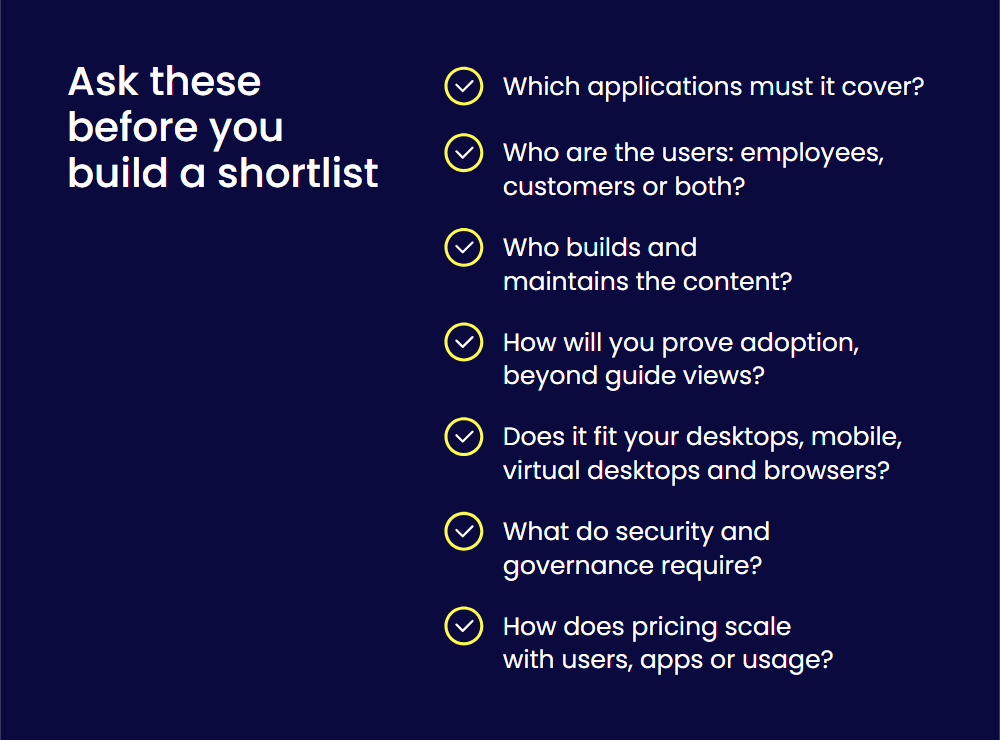
Work through these questions before you build a shortlist.
- Which applications must it cover? A tool tied to one vendor’s suite suits a single rollout. A stack of many applications needs a solution that works across them all.
- Who are the users? Some solutions focus on employees, some on customers, and some serve both.
- Who builds and maintains the content? Check how much the authoring tool asks of your team, and how content stays current after software updates.
- How will you prove adoption? Look for analytics that show usage, completion, and friction, not only guide views.
- Does it fit your environment? Confirm support for desktop, mobile, and virtual desktops, and for the browsers your company allows.
- What do security and governance require? Review certifications, hosting regions, and permissions early.
- How does pricing scale? Most vendors quote by users, applications, or usage, so model the cost of a wider rollout.
If your main goal is employee training, compare dedicated employee training software as well. For a longer evaluation framework, read the digital adoption platform buyer’s guide. To see how three enterprise platforms compare on security, AI, and analytics, read which digital adoption platform is best for enterprise.
One note for SAP customers: SAP says SAP Enable Now is evolving into WalkMe’s learning solution, so we haven’t listed it separately. If you use it today, ask your SAP contact about the transition path.
How we chose these solutions
We kept the list to enterprise application solutions. We left out tools built mainly for onboarding inside a single SaaS product, and tools that only produce documentation.
We compared each solution on six criteria:
- in-app guidance for enterprise applications,
- coverage across applications,
- analytics on adoption,
- integrations,
- pricing transparency,
- verified review ratings.
Features, plans, and prices come from each vendor’s own product, pricing, documentation, and help pages. Ratings come from G2, with review counts. We checked every fact in October 2026.
Turn software investment into adoption
Buying software is the easy part. The return comes later, when people use it well, every day, across every application.
That matters even more as companies add AI tools to their stack. An assistant only helps if people use it in their real workflows, and if you can see that they do. WalkMe turns AI potential into AI performance. It gives people in-context help across applications, and it gives you the analytics to prove adoption.
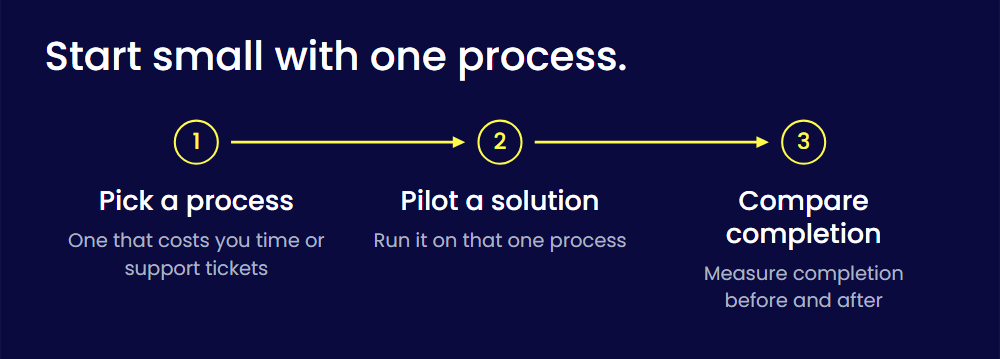
Start small. Pick one process that costs you time or support tickets, pilot a solution on it, and compare completion before and after. If you need the plan before the tool, read our guide to digital adoption strategy.
FAQs
A digital adoption solution is software that sits on top of a business application and guides people through tasks inside it. It adds on-screen guidance, automation, and analytics, so employees and customers can use the application fully. For a longer explanation of how the technology works, read WalkMe’s glossary entry on the digital adoption platform.
DAP stands for digital adoption platform. In software, a DAP is a layer that runs on top of other applications and gives users in-app guidance. “DAP solutions” and “digital adoption solutions” mean the same thing in this article. Outside software, DAP has unrelated meanings, which is why searches for the term often return other companies.
There’s no single best platform, because the right choice depends on your applications and users. Platforms such as WalkMe, Whatfix, and Lemon Learning cover many enterprise applications. Oracle Guided Learning suits Oracle rollouts, and Pendo suits teams that want product analytics with guidance. The table at the top compares all 10 options by best fit and pricing.
Start with the applications you need to cover and the people who use them. Then check how content is built and maintained, what the analytics can prove, and how the solution handles security and governance. Ask each vendor for a quote based on your real user and application counts, because most enterprise pricing isn’t published.
Look for in-app guidance that works across your applications, automation for repetitive steps, and analytics that show where people get stuck. A no-code editor matters if business teams will build the content. Enterprise buyers should also check integrations, supported browsers and devices, and published security certifications.
Most run as a layer on top of the application, delivered through a browser extension or a code snippet. Some are embedded in one vendor’s applications, as Oracle Guided Learning is in Oracle’s. Others, such as Nexthink Guides, depend on a wider platform. Desktop and mobile apps may need extra setup, so confirm coverage for each application you plan to support.
A digital adoption solution helps people become productive in new software sooner, because guidance appears inside the application as they work. It can reduce support requests, since users find answers on their own. Its analytics also show which processes cause friction, so you can fix them and get more from the software you’ve bought.