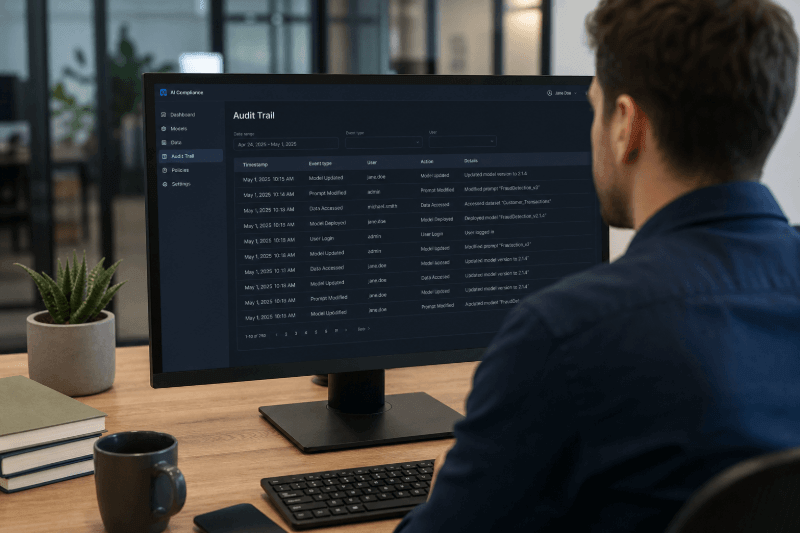
What Is an AI Compliance Audit Trail?

If your organization cannot show how an AI system was used, reviewed, and governed, it will struggle to defend its compliance posture. That is the practical reality behind EU AI Act enforcement, especially as Article 14 and Article 26 became enforceable on 2 August 2026, while Article 4 has been in force since 2 February 2025.
An AI compliance audit trail is the documented, time-stamped record of AI system decisions, human oversight actions, workflow steps, policy controls, and evidence needed for accountability. Under WalkMe’s EU AI Act messaging framework, these duties must be “met continuously and evidenced on request.” That standard matters because regulators, internal audit teams, legal stakeholders, and procurement teams will not stop at policy documents. They will ask what actually happened, who approved what, and whether the required controls operated in practice.
This article explains what an AI compliance audit trail is, why it matters for EU AI Act compliance, what records you should keep, and how to build an audit-ready process across real enterprise workflows. It also looks at where auditability usually breaks down, especially when AI-supported work spans multiple applications, approvals, and handoffs. If you are trying to move from policy intent to defensible record keeping, this is the proof layer you need to understand.
What is an AI compliance audit trail?
The simplest way to define an AI compliance audit trail is this: it is the evidence trail that shows how your AI controls worked in daily operations. It is not just a technical log. It is a defensible record of what the AI system did, what people did in response, what rules applied, and whether oversight happened when it was supposed to.
That distinction matters because the EU AI Act does not treat compliance as a paper exercise. WalkMe’s EU AI Act source material states that deployers of high-risk AI systems must ensure staff have sufficient AI literacy, make sure “a real person can understand, monitor, correctly interpret, override, and stop a high-risk AI system,” and “keep automatically generated logs for at least six months.” It also says these duties “must be met continuously and evidenced on request.”
So what belongs in an AI compliance audit trail? At a minimum, it should include documented system activity, human review steps, approvals, overrides, notifications, and retained logs tied to specific users, tools, tasks, and timestamps. The SAP Joule Agents compliance brief frames the same principle through four audit questions: “Who acted?”, “What were they authorized to do?”, “What did they actually do?”, and “On whose behalf did they act?”
In practice, that means your audit trail has to connect policy to execution. It should help you reconstruct a workflow, test whether required controls were followed, and answer an auditor’s question with evidence rather than assertion.
Why AI compliance audit trails matter for EU AI Act enforcement
Once you define the audit trail, the next question is why it matters so much. The answer is simple: EU AI Act compliance is not only about having policies. It is about proving that those policies operated in real workflows.
WalkMe’s EU AI Act messaging makes that explicit. It says deployers must not only meet duties under Articles 4, 14, and 26, but also demonstrate them “inside the applications where AI is actually used.” The Deployer Readiness Checklist sharpens the same point: “Check a box only if the mechanism is actually operational, not just written into policy.” That is the difference between governance intent and audit-ready evidence.
This becomes critical the moment someone asks for proof. Internal audit may want to verify that oversight records exist for every AI-influenced decision. Legal may need evidence that workers were informed when subject to a high-risk AI system. Procurement or risk teams may ask whether your vendor’s controls cover your own deployer obligations. The checklist is clear here too: “Your AI vendor’s compliance documentation covers the vendor. It doesn’t cover you.”
The enterprise risk is that many organizations can describe governance at a policy level but cannot reconstruct what happened across day-to-day workflows. WalkMe’s source material identifies the core problem as “no consistent, auditable compliance layer,” with records that are “scattered or missing.” When AI work crosses custom apps, ERP workflows, service tools, and legacy systems, disconnected logs make auditability fragile. The compliance issue is not just whether controls exist. It is whether you can prove they operated when it mattered.
What records should you keep for AI compliance?
Once enforcement becomes real, the most practical question is what evidence you should actually retain. The short answer is that record keeping needs to follow the AI lifecycle and the workflow, not just the policy file.
The WalkMe checklist starts with role and system mapping. It says “every role that touches an AI system is documented: which tool, which task, what risk level,” and warns that a blanket training module does not satisfy the requirement. For Article 4, records must be “queryable by person, role, and date,” and the system should be able to export “employee ID, role, course, timestamp, and AI tool in one pull.” That gives you a baseline for literacy evidence.
For Article 14, you need oversight records tied to specific decisions. The checklist says “every AI-influenced decision generates an oversight record,” including “who reviewed it, what they decided, and when.” It also recommends confirming that logging captures “user, timestamp, tool, task, and whether the person accepted or overrode the AI output.” Those fields are central to a defensible AI compliance audit trail.
For Article 26, the scope expands to deployer-level usage, instructions for use, incidents, and retention controls. The checklist calls for “a deployer-level usage log” across every AI tool in scope with “user, tool, task, and timestamp,” and notes that “12 months is a reasonable floor” for retention. It also says “log retention and access controls are locked down” because “a log that can be edited isn’t audit-ready.”
The exact retention model depends on your use case, risk classification, legal obligations, and internal governance rules. But the goal stays the same: consistent traceability from system purpose and access rights to outputs, approvals, exceptions, incidents, and remediation actions.
The key elements of an audit-ready AI record system
Knowing what to keep is useful, but audit readiness depends on how consistently you capture and govern that evidence. A reliable AI compliance audit trail is less about raw volume and more about whether records can stand up to review.
First, your capture model must be consistent. The SAP Joule Agents compliance brief defines an effective audit trail through four recurring questions: who acted, what they were authorized to do, what they actually did, and on whose behalf they acted. That structure matters because it links action to identity, authorization, and delegation. If you can only show one of those elements, your auditability is partial.
Second, your records need governance rules around retention, access, and integrity. The checklist states that “a log that can be edited isn’t audit-ready,” and says write access should be restricted to admins and “enforced technically, not just by policy.” It also requires deployers to control their own usage log in “a format you can produce.” Strong record keeping is not only capture. It is controlled capture.
Third, human oversight must appear in the record, not just in a control framework. The EU AI Act messaging says a real person must be able to “understand, monitor, correctly interpret, override, and stop” a high-risk AI system. The SAP brief adds that users must retain the ability to “review, override, and reverse agent-executed actions,” with a non-AI alternative pathway available. An audit-ready system should make those oversight actions visible in workflow evidence.
Finally, the records must map to real execution across applications. WalkMe’s source material warns that most organizations lack “a consistent way to embed compliant behavior into the applications where AI is used and to record that behavior for audit.” That is where enterprise AI often fails the audit test. Logs live in disconnected systems, oversight happens outside the workflow, and no shared context ties the record together.
How to create an AI compliance audit trail step by step
Once you know the elements, the next step is building a practical framework. The most effective approach starts with scope, then moves into controls, evidence capture, monitoring, and review.
Start by inventorying your AI systems and mapping risk. The checklist says to “inventory every AI tool in use” and cross-check each against the Act’s high-risk categories, flagging anything borderline for legal review. You also need role-based AI mapping that documents “which tool, which task, what risk level, training requirement.” Without that inventory, your AI compliance audit trail will never be complete because you will not know what should be in scope.
Next, design controls at the workflow level. For Article 14, the checklist says a human override mechanism must be “built and tested,” not merely described. At each decision point where AI output affects a human action, organizations should “add a step that surfaces the recommendation, requires acknowledgment, and logs the human’s call.” The same document says override should take “three steps or fewer.” That is how you turn policy into operating behavior.
Then define what evidence gets captured and where. For literacy, training should happen “in the workflow, not just in an LMS,” and completion should be logged “per person, per tool, at that moment.” For oversight, logging should capture “user, timestamp, tool, task,” plus the acceptance or override decision. For deployer obligations, you need an active usage log across tools you control directly, not only vendor logs.
After capture, establish monitoring and retention rules. The EU AI Act messaging says deployers must “monitor operation” and “keep automatically generated logs for at least six months.” The checklist goes further by recommending a 12-month retention floor and technically enforced access controls. You should also define an incident reporting path before you need it, including what counts as a serious incident and who handles escalation.
Finally, test whether you can produce the record on demand. The checklist repeatedly recommends sample exports and test pulls. That is a useful discipline because enterprise workflows rarely stay in one system. They cross interfaces, approvals, and handoffs. If your evidence cannot follow the workflow, your auditability will break down under review.
Common gaps that make AI compliance records hard to defend
Even organizations that believe they are logging enough data often miss the gaps that matter most. In practice, weak records usually come from fragmentation, inconsistency, and overreliance on manual processes.
WalkMe’s EU AI Act messaging says many organizations have records that are “scattered or missing.” It also notes that AI is used across “a wide mix of applications, including custom-built and legacy systems that were never designed with these controls.” When logs sit in separate tools with no shared workflow context, you may have data but still lack a defensible AI compliance audit trail.
Employee behavior creates another weakness. The checklist warns that “a training certificate isn’t enough” and that “a policy that says oversight exists isn’t oversight.” If guidance appears before the task instead of at the point of decision, employees may skip required reviews or fail to document overrides. That leaves you with policy language but not evidence.
Manual record keeping adds one more risk. The checklist says a deployer-level usage log must be active across every AI tool in scope and in a format you can produce. If teams maintain logs by hand, allow editable records, or rely only on vendor documentation, your auditability will be difficult to defend. The problem is often not missing policy. It is missing workflow-level evidence.
Examples of AI compliance audit trails in practice
The best way to make this concrete is to look at how an AI compliance audit trail should work in real enterprise scenarios. The details vary by workflow, but the accountability pattern stays the same.
In HR, a high-risk hiring or performance workflow might require a record showing the AI tool used, the employment-related task, the reviewer’s identity, the timestamp, the output presented, and whether the reviewer accepted, flagged, or overrode the recommendation. This aligns with the checklist requirement that every AI-influenced decision generate an oversight record and with SAP’s principle that users can “review, override, and reverse” actions.
In customer service, the record may focus on whether an employee followed instructions for use, received in-context guidance, and applied human judgment before acting on an AI-generated recommendation. WalkMe’s EU AI Act source emphasizes that oversight must happen “at the point of decision,” not only in prior training. Good evidence here includes the trigger, the context shown to the user, the AI output, the prompt to review, the human action, and the final outcome.
In procurement, the audit trail may need to show who accessed the AI-supported workflow, what they were authorized to do, what action the system attempted, and what was approved or blocked. That mirrors the SAP audit model: who acted, what they were authorized to do, what they actually did, and on whose behalf they acted. The workflow changes, but strong record keeping still connects trigger, context, AI output, human oversight, and final result.
How WalkMe helps create audit-ready AI compliance records
Once the compliance challenge is clear, the practical question becomes how to capture evidence where the work actually happens. This is where WalkMe fits.
WalkMe is the execution and accountability layer that helps organizations turn written obligations into “guided, validated, and recorded behavior in the flow of work.” According to the EU AI Act messaging source, WalkMe is “not a governance, risk, and compliance platform, and it is not a legal advisor.” It is the practical layer that helps deployers meet and demonstrate obligations inside the applications where AI is used.
The WalkMe action bar supports this in four ways. It provides screen-level context so guidance appears at the moment of use, not in a separate document. It creates cross-application unification across the mix of modern, custom, and legacy applications where high-risk AI is used. It gives you visibility into workflow execution, including whether required review, validation, and oversight steps were followed. And it records app interaction activity so your organization can “respond to regulatory inquiries with evidence rather than assertions.”
That matters because EU AI Act compliance often breaks down at workflow boundaries. WalkMe helps you capture the record where the employee acts, where the overseer intervenes, and where the evidence must exist to support auditability.
AI compliance audit trails are the proof layer for EU AI Act readiness
An AI compliance audit trail is the proof layer that connects AI governance policy to real operational evidence. For EU AI Act compliance, that matters because duties under Articles 4, 14, and 26 are continuous obligations that must be evidenced on request.
The key takeaways are straightforward. Policies are not enough if the mechanism is not operational. Record keeping has to follow the workflow, not just the system of record. And auditability depends on evidence that shows what happened, who reviewed it, what controls applied, and whether human oversight worked in practice.
If you need a better way to support AI accountability across complex workflows, explore how the WalkMe action bar helps capture screen-level context, cross-application visibility, and audit-ready workflow records. WalkMe turns AI potential into AI performance.
FAQs
An AI compliance audit trail is the documented, time-stamped record of how an AI system was used, reviewed, and governed in practice. Based on the source material, it should show actions taken, oversight decisions, user and tool details, timestamps, and the controls that operated during the workflow.
The source material points to several core categories: role-based training records, user and tool activity logs, oversight records for AI-influenced decisions, instructions-for-use reviews, incident records, and retention and access-control evidence. The Deployer Readiness Checklist specifically calls for queryable records by person, role, and date, plus logging fields such as user, tool, task, and timestamp.
Start by inventorying AI tools and mapping them to roles, tasks, and risk levels. Then build operational controls into the workflow, define what evidence gets logged, apply retention and access controls, and test whether you can export complete records on demand.
Auditability matters because regulators, auditors, and legal teams will ask for evidence that controls worked in practice. WalkMe’s EU AI Act messaging says these duties must be “met continuously and evidenced on request,” while the checklist warns that mechanisms must be operational, not just written into policy.
They need workflow-level records showing who reviewed the AI output, what decision they made, and when. The checklist says every AI-influenced decision should generate an oversight record, and the SAP compliance brief adds that users should be able to review, override, and reverse agent-executed actions, with those actions captured in the audit trail.